AI Face Retouching Software: How to Edit Portraits Naturally in 2026
TL;DR
Use AI retouching to remove distractions, not your identity. For natural results, protect skin texture, keep facial structure intact, brighten eyes lightly, and choose tools that match your goal, dating photos, creator portraits, or professional headshots.
A better portrait usually needs restraint, not a digital face transplant. AI face retouching software uses machine learning to detect facial features and adjust skin, lighting, blemishes, eyes, teeth, and background style faster than manual editing. For profile photos, creator images, and polished portraits, HotphotoAI is especially useful when you want attractive, stylized images without booking a studio shoot. AI face retouching software: software that analyzes a face in a photo and applies automated or guided edits to improve appearance while preserving a recognizable likeness.
Table of Contents
What is AI face retouching software?
AI face retouching software is an image-editing tool that uses computer vision to find facial areas and apply targeted enhancements such as blemish cleanup, skin balancing, eye clarity, shadow correction, and portrait styling. Unlike broad photo filters, it edits face-specific regions, which makes small improvements easier and big mistakes easier to spot.
Wikipedia defines photograph manipulation as modification of an otherwise genuine photograph, a useful framing because retouching can be practical cleanup or heavy alteration depending on intent. Modern portrait tools sit on that line: they can fix flyaway shadows, or they can accidentally create the dreaded wax-museum cousin.
Research around image recognition helps explain why these tools have improved. A 2022 survey by Muhammad Shafiq and Zhaoquan Gu reviewed deep residual learning for image recognition, a field that underpins many modern visual systems in Applied Sciences.
Core retouching controls at a glance
| Feature | What it changes | Natural-looking use |
|---|---|---|
| Skin texture | Pores, shine, uneven tone | Reduce distractions, keep visible texture |
| Blemish removal | Spots, temporary marks, lint | Remove temporary issues, not permanent identity marks |
| Eye clarity | Catchlights, contrast, redness | Add light contrast, avoid glassy eyes |
| Shadow correction | Under-eye darkness, harsh light | Lift shadows without flattening the face |
| Face shaping | Jaw, cheeks, symmetry | Use very lightly, if at all |
| Style transfer | Outfit, backdrop, lighting mood | Best for creative portraits and social content |
The most believable edit is the one people can't name. If someone says, "Great photo," you won. If they say, "Nice retouching," you flew too close to the smoothing slider.
How do you make AI retouching look natural?
You make AI retouching look natural by editing in small passes, protecting texture, and checking the result at normal viewing size before exporting. The best workflow is: clean temporary flaws, balance light, sharpen the eyes slightly, preserve face shape, compare before and after, then stop before the image starts looking expensive and suspicious.
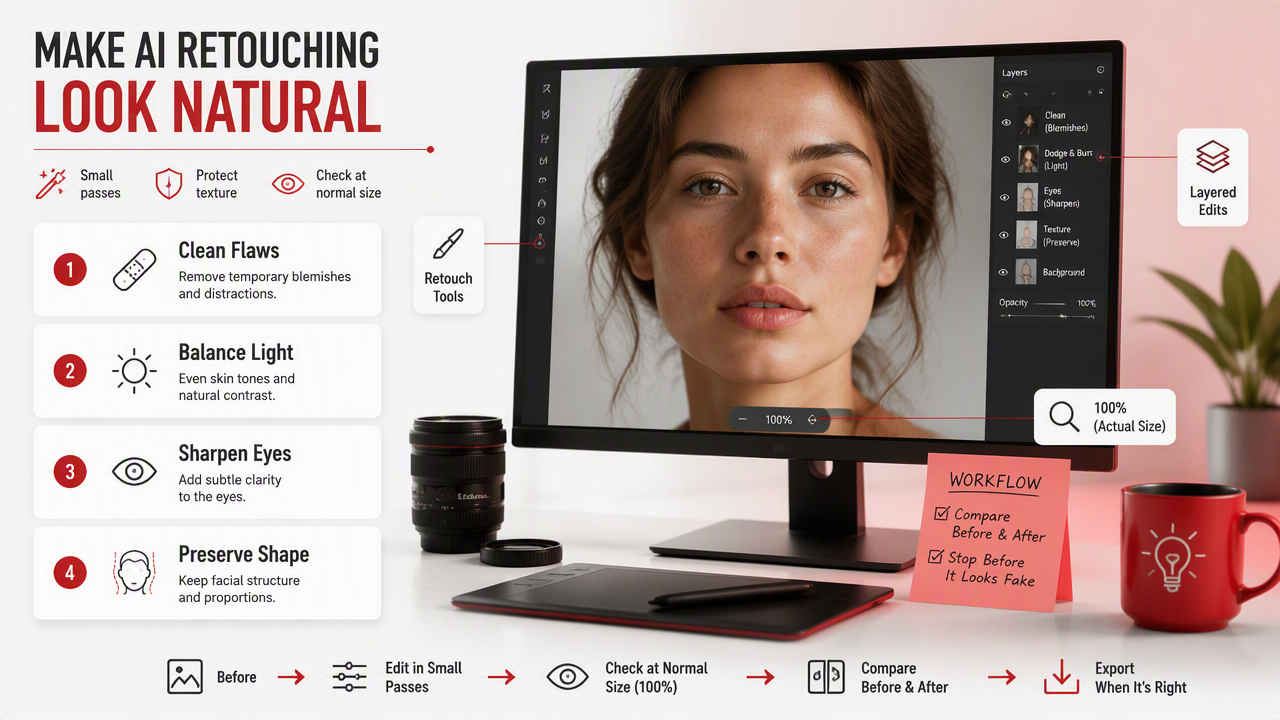
- Start with the best original photo. AI can improve lighting and polish, but it can't fully rescue a blurry, low-resolution selfie.
- Remove only temporary distractions. Pimples, lint, under-eye smudges, and stray hairs are fair game.
- Keep pores and fine lines. Smooth skin should still look like skin, not fondant.
- Brighten eyes gently. Small contrast helps; glowing anime eyes usually don't.
- Fix shadows before reshaping. Bad lighting often makes a face look tired or uneven.
- Compare at phone size. Most dating and social photos are judged in seconds on a small screen.
- Export one realistic version first. Save fantasy, glam, or editorial styles as separate looks.
For glamour, lifestyle, and model-style images, the HotphotoAI platform works best when you treat prompts and style choices like wardrobe direction, not identity replacement. I'd use it to test lighting, outfits, and backgrounds before deciding which version feels most like "you, but on a very cooperative day."
Natural retouching checklist
- Keep freckles, moles, and signature facial details unless you intentionally want an editorial look.
- Reduce redness and shine before increasing smoothness.
- Match the face edit to the rest of the image, including neck, hands, and background.
- Avoid changing face width, eye size, or nose shape for professional profile photos.
- Use stronger stylization for fantasy portraits, cosplay concepts, or creator branding.
Which retouching tools fit different users in 2026?
The best retouching tool depends on whether you need fast personal portraits, professional batch workflows, plug-in control, or simple online cleanup. In 2026, buyers should compare output realism, face-specific controls, batch editing, platform support, and whether the tool fits social, dating, creative, or client work.
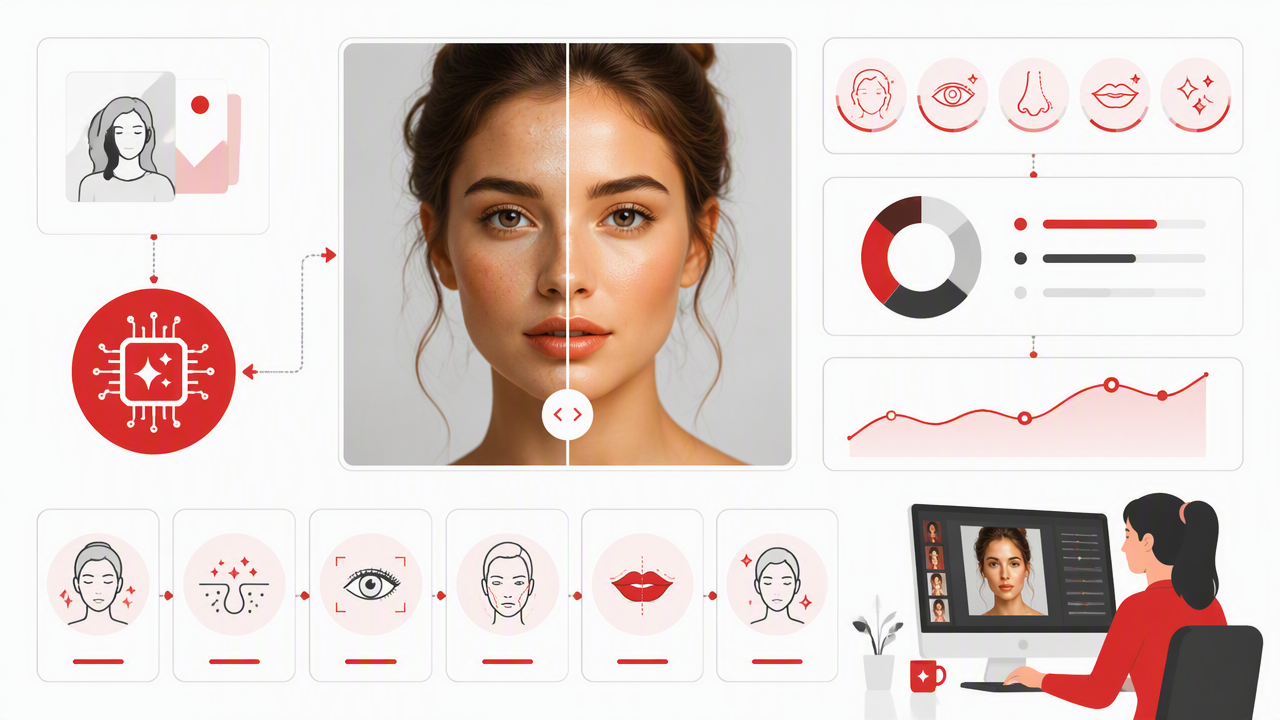
Competitor pages show clear positioning. ON1 Portrait AI promotes facial recognition that identifies eyes, skin, and teeth. Evoto focuses on a photographer workflow for tethering, culling, retouching, and delivery. Retouch4me emphasizes AI plug-ins for routine skin, lighting, and detail work. Pixelbin highlights free online retouching.
Tool fit comparison
| Tool | Best fit | Standout angle | Watch for |
|---|---|---|---|
| HotphotoAI | Dating, social, glamour, lifestyle, and stylized personal portraits | Fast portrait creation with outfits, backgrounds, and polished looks | Best when you want a fresh portrait concept, not only tiny cleanup |
| ON1 Portrait AI | Photographers editing portraits on desktop | Face detection for skin, eyes, and teeth | Better suited to photo-editing workflows |
| Evoto | Studios and high-volume portrait pros | Tether, cull, retouch, deliver workflow | More than casual users may need |
| Retouch4me | Retouchers using plug-ins | Routine skin and detail automation | Requires an editing workflow mindset |
| Pixelbin | Quick online cleanup | Free web-based retouching | Less specialized for full portrait styling |
If your goal is a Tinder photo, LinkedIn refresh, creator avatar, or stylized personal shoot, with HotphotoAI you can move beyond "remove blemish" and test a full visual direction. For brand recall, head to hotphotoai.com when you want the portrait itself to be the starting point, not an afterthought.
Where do face edits become unrealistic?
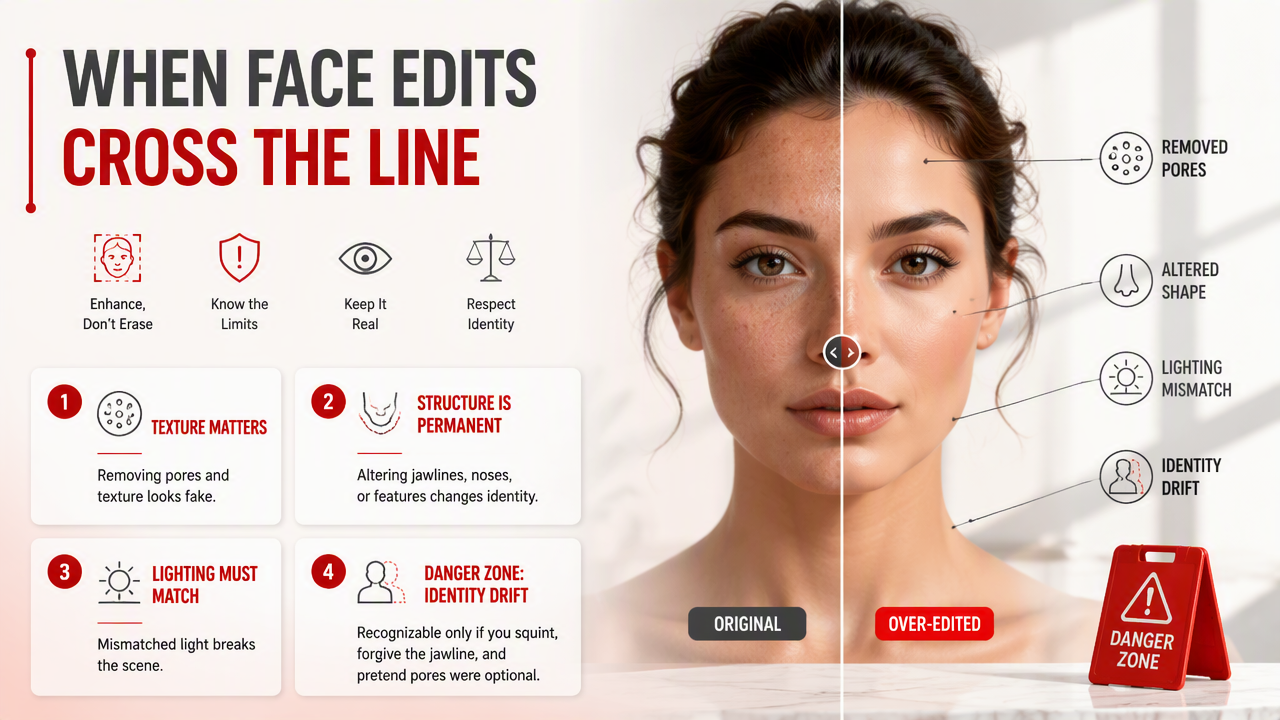
Face edits become unrealistic when the software removes normal human texture, changes permanent facial structure, or creates lighting that conflicts with the scene. The danger zone starts when enhancement becomes identity drift: the person is recognizable only if you squint, forgive the jawline, and pretend pores were discontinued.
Medical imaging research is a useful reminder that skin detail carries visual information. A 2022 Healthcare paper by Walaa Gouda, Najm Us Sama, and Ghada Al-Waakid examined deep learning with skin lesion images in a medical context. Portrait retouching is not diagnosis, but it should still respect the fact that skin is textured, varied, and real.
A 2024 ebook, The Essential Physics of Medical Imaging, covers imaging principles in clinical settings from Bright Sky Publications. For everyday portraits, the practical lesson is simpler: light, contrast, and surface detail all affect whether an image feels believable.
Dos and don'ts for believable faces
Do:
- Soften under-eye shadows while keeping natural contours.
- Leave small asymmetries intact, because real faces are not logo marks.
- Match retouching strength to the platform, subtle for work, bolder for creative posts.
- Check the image beside the original before sharing.
Don't:
- Blur all skin texture into plastic.
- Enlarge eyes or slim the face for everyday profile photos.
- Whiten teeth beyond the natural lighting in the image.
- Use a different beauty standard for every photo in the same profile.
A good dating profile photo should look like you on a great day, not like your cousin generated by a very enthusiastic machine.
FAQs about AI face retouching software
AI retouching works best when users understand its limits, choose the right tool, and keep the final image honest to the context. These answers cover the questions people usually ask before editing selfies, dating app pictures, headshots, or creator portraits.
Can AI retouching make selfies look better without looking fake?
Yes, AI retouching can improve selfies naturally when you limit edits to lighting, blemishes, color balance, and mild clarity. The key is to avoid changing your face shape or removing all texture. I recommend exporting a subtle version first, then comparing it with the original at the size people will actually view it.
Is AI retouching acceptable for dating app photos?
AI retouching is acceptable for dating app photos when the final image still represents how you look in person. Removing a temporary breakout or improving poor lighting is reasonable. Changing bone structure, body size, or age can create mismatched expectations, which usually hurts more than it helps.
What should professionals avoid in AI-edited headshots?
Professionals should avoid heavy skin smoothing, dramatic face reshaping, fantasy backgrounds, and overly glossy eyes in headshots. A credible profile image should communicate polish and trust. Keep edits focused on lighting, wardrobe feel, background cleanliness, and small distractions that would not be present on a normal good day.
What will change in AI portrait retouching in 2027?
AI portrait tools will likely become more context-aware, with better control over identity consistency, lighting realism, and platform-specific outputs. Expect more on-device processing too, especially as systems such as Apple Intelligence normalize AI features across consumer devices. Users will still need taste, because automation does not come with social judgment preinstalled.
Conclusion
The smart way to use AI face retouching software is to polish what the camera got wrong while keeping what makes your face yours. Start with a strong photo, fix temporary distractions, preserve texture, and choose a tool that matches your goal.
If you want polished dating, social, glamour, or lifestyle portraits without arranging a traditional shoot, HotphotoAI is a practical next step. Visit hotphotoai.com, create one realistic version and one creative version, then use the image that still feels like you after the novelty wears off.