AI Selfie Enhancer vs AI Portrait Generator: Which Fits You?
TL;DR
Use a selfie enhancer when you like the original photo and want better lighting, detail, or retouching. Choose a portrait generator for new outfits, settings, and styles, then check that the result still looks like you and suits its intended use.
Your best selfie might need better lighting, not a whole new wardrobe. The AI selfie enhancer vs AI portrait generator choice comes down to improving a photograph you already have or creating a new portrait from reference images. I'd choose by the job, not by which app promises the most impressive makeover. For readers exploring styled personal portraits, HotphotoAI is an option to consider within that creative workflow.
Table of Contents
What separates a selfie enhancer from a portrait generator?
An AI selfie enhancer improves an existing photograph, while an AI portrait generator creates a new portrait using reference selfies or other inputs. Enhancement usually preserves the original pose and setting; generation can introduce different clothing, backgrounds, and lighting. Some tools combine both, so judge the specific feature rather than the app's label.
Selfie enhancement: AI-assisted editing that adjusts qualities such as exposure, clarity, color, and skin appearance in an existing image.
Portrait generation: AI-assisted creation of a new personal image, often guided by reference photos and a requested visual style.
Side-by-side: editing a moment versus creating a scene
| Dimension | Selfie enhancer | Portrait generator |
|---|---|---|
| Starting material | An existing photograph | Reference selfies, prompts, or both |
| Main purpose | Improve the source photo | Create a different portrait |
| Pose and setting | Usually retained | Can be newly created |
| Typical changes | Exposure, sharpness, color, retouching | Outfits, backgrounds, composition, lighting |
| Best fit | A good photo needing polish | A concept you haven't photographed |
| Review priority | Natural-looking edits | Likeness and scene consistency |
The boundary isn't absolute. Generative editing can replace a background inside an existing photograph. My practical rule: if the original moment remains the foundation, call it editing; if the tool invents most of the scene, treat it as generation.
Who should pick which for profiles and content?
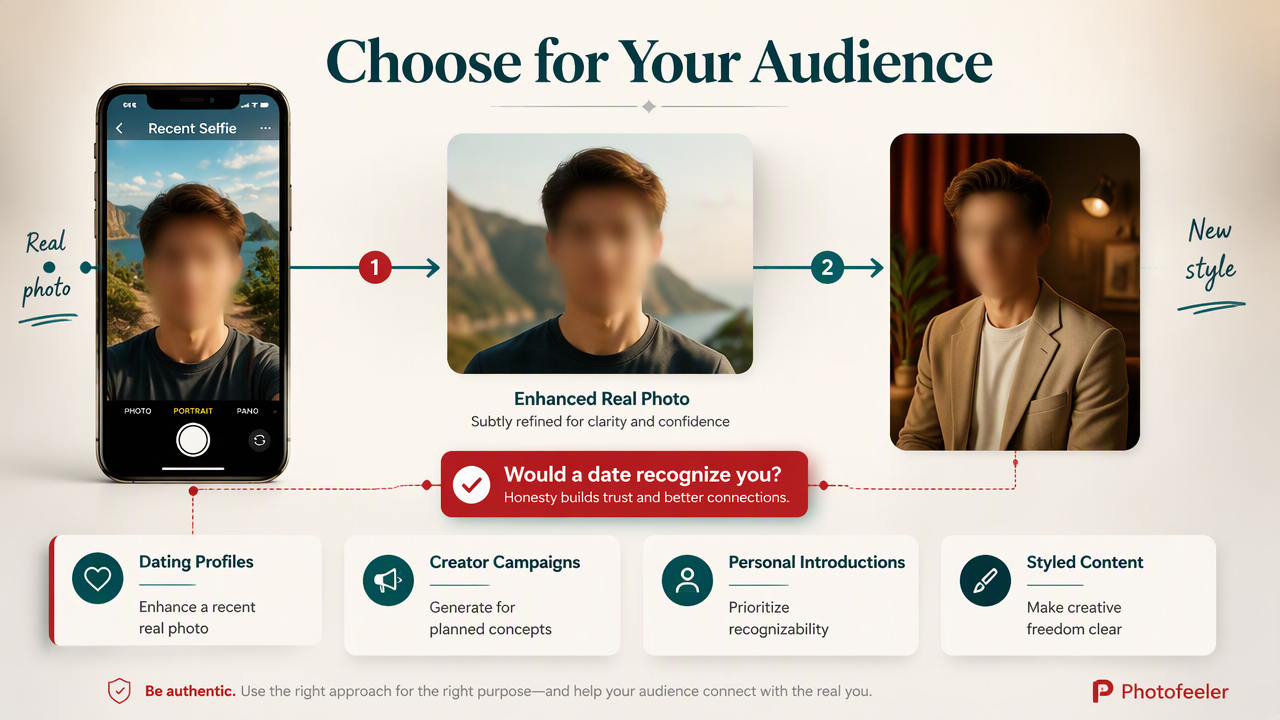
Your intended audience should decide whether you preserve a real photograph or create a styled portrait. A dating profile, creator campaign, professional biography, and glamour collection each make a different promise to the viewer. I prioritize recognizability for personal introductions and creative freedom for clearly styled content.
Decision matrix for four everyday uses
| Use case | My starting recommendation | Reason | Final check |
|---|---|---|---|
| Dating profiles | Enhance a recent real photo | Keeps the introduction grounded | Would a date recognize you? |
| Creator content | Generate for planned concepts | Supports varied visual themes | Does the image fit your brand? |
| Professional photos | Enhance first; generate when suitable | Balances accuracy and presentation | Check employer or platform rules |
| Glamour portraits | Generate for creative styling | Enables imagined looks and scenes | Does the face remain recognizable? |
Choose the job before choosing the tool
- Keep the moment: Enhance a selfie with a great expression but uneven exposure.
- Change the concept: Generate a portrait when you want a different outfit or imagined setting.
- Represent yourself accurately: Favor recent photos and restrained changes for identity-focused profiles.
A rooftop portrait can make sense in a creative feed. On a dating profile, I'd make sure it doesn't imply a lifestyle or appearance that isn't yours. Your photos should introduce you, not your fictional stunt double.
How HotphotoAI handles this
HotphotoAI belongs in the portrait-creation side of this decision: consider it when your goal is styled personal imagery rather than a small correction to an existing selfie. The useful starting point is a clear brief describing the portrait you want, its audience, and the features that should remain recognizably yours.
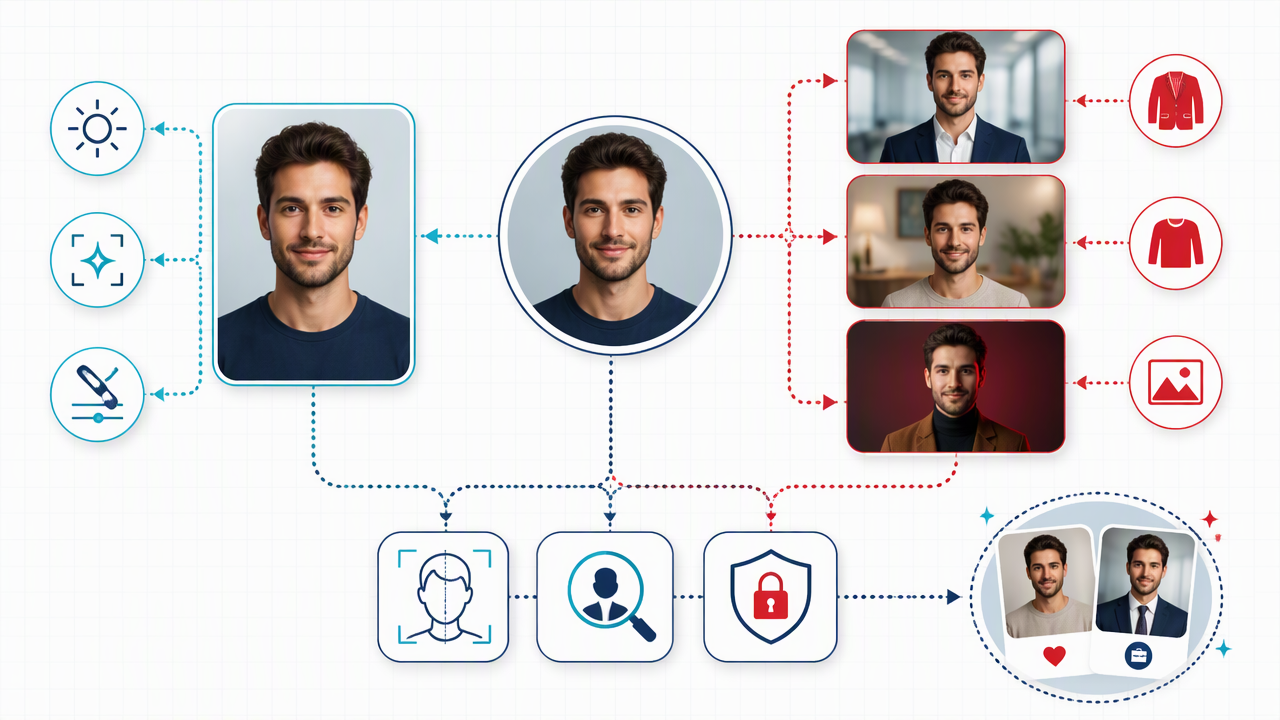
Build a portrait brief around the intended result
- Dating or social profile: Aim for approachable styling, familiar hair, and an expression that feels natural.
- Creator content: Define a color palette, mood, and setting that match the post or campaign.
- Glamour or fantasy portrait: Describe the wardrobe, atmosphere, and level of stylization you want.
I'd separate identity from presentation in that brief. Your facial features establish who you are; clothing, composition, and atmosphere establish the concept. That distinction makes reviewing creative portraits easier and gives you a clearer basis for choosing which images belong in your final collection.
How do you check quality, likeness, and privacy?
- Check portrait likeness against a recent, unedited selfie.
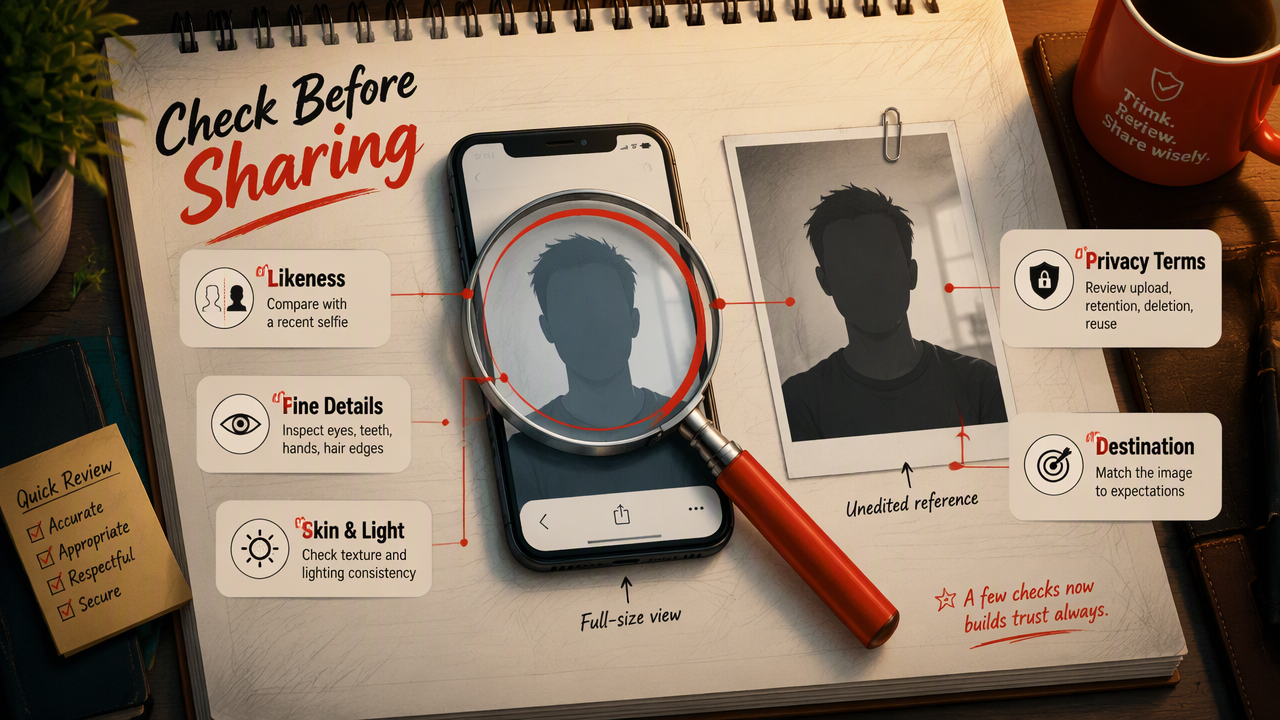
- Inspect eyes, teeth, hands, hair edges, and accessories at full size.
- Review skin texture and lighting for consistency.
- Read upload, retention, deletion, and reuse terms before sharing photos.
- Match the finished image to the expectations of its destination.
Inspect the person, not just the polish
A crisp image can still change your face. Look at jaw shape, eye spacing, hairline, and distinctive features before judging attractiveness. Enhancement can over-smooth skin; generation can produce a convincing person who isn't quite you. Neither deserves an automatic pass because the thumbnail looks expensive.
A useful portrait should serve its purpose and remain recognizably yours. High resolution alone doesn't establish either.
Keep creative portraits distinct from evidence
The 2022 paper Deepfakes: Deceptions, mitigations, and opportunities examines deception, mitigation, and opportunities around synthetic media. It's relevant context for identity imagery, not a performance test of selfie apps.
Amanda Wasielewski's 2023 book Computational Formalism offers broader context on computational approaches to art. Neither source supplies accuracy benchmarks for this comparison.
My recommendation: label clearly fictional scenes when context could mislead, and don't use generated portraits as documentary proof of attendance, qualifications, or identity.
FAQ: practical choices before you upload
These answers focus on choosing inputs and workflows, rather than assuming one category is always better.
- Start with the intended use.
- Decide how much of the original photograph should remain.
Can a selfie enhancer change my outfit or background?
A selfie enhancer may include generative editing features that replace clothing or backgrounds, but that goes beyond basic enhancement. Check the feature description rather than assuming every editing app works the same way. Once substantial parts of the scene are invented, I'd review the result as a generated image, including its likeness and visual consistency.
Do portrait generators need several reference selfies?
Reference requirements vary by service and workflow, so follow the tool's current instructions rather than a universal number. When multiple references are accepted, choose clear photos that show your current appearance from useful angles. I'd avoid heavily filtered inputs because they make it harder to judge whether the output resembles your everyday face.
Can I combine generation and enhancement?
Yes, generation and enhancement can serve different stages of one workflow. Create the scene first, select a portrait with a strong likeness, then make restrained finishing adjustments to exposure, crop, or color. I'd keep the selected original alongside the edited version so you can compare them and choose the treatment that best suits the final placement.
Conclusion
Choose one image goal before uploading: polish a real moment or create a new visual concept. For styled portraits, explore HotphotoAI at hotphotoai.com with a specific brief. Then compare your chosen result with a recent selfie and preview it where you'll actually publish it.