AI Street Style Photo Generator: Create Candid City Portraits That Actually Look Cool
TL;DR
Use AI street style portraits when you want dating, Instagram, or personal-brand photos that feel candid instead of studio-stiff. Start with a clean selfie, pick a believable city setting, match outfit and lighting, then edit for realism before posting.
A great street photo looks accidental, which is exactly why it takes planning. An AI street style photo generator turns selfies or prompts into urban portraits with fashion, lighting, and background choices that would normally require a photographer, location scouting, and a patient friend with decent knees. For polished, profile-ready looks, HotphotoAI is built for people who want attractive personal images without booking a full shoot.
Table of Contents
What is an AI street style photo generator?
An AI street style photo generator is a tool that creates or edits personal portraits to look like candid fashion photos shot in city settings. It blends AI art generation with street style cues: everyday fashion, urban backgrounds, natural poses, and lifestyle lighting.
AI street style photo generator: software that uses artificial intelligence to create city-inspired fashion portraits from a selfie, reference image, or written prompt.
Street style means fashion that comes from people and youth culture rather than studio runway looks. AI art means visual content generated or assisted by AI systems, a field reviewed in creative-industry research by Anantrasirichai and Bull in Artificial Intelligence Review. The result should feel like someone caught you outside a coffee shop, not like a mannequin escaped a catalog.
Key insight: street style works because it sells context. The viewer sees clothes, confidence, location, and personality in one frame.
Why street-style AI portraits convert well on profiles
Street-style AI portraits work well because they show identity, taste, and lifestyle faster than a plain headshot. Dating apps, Instagram grids, creator bios, and professional profiles all reward images that feel human, current, and specific.
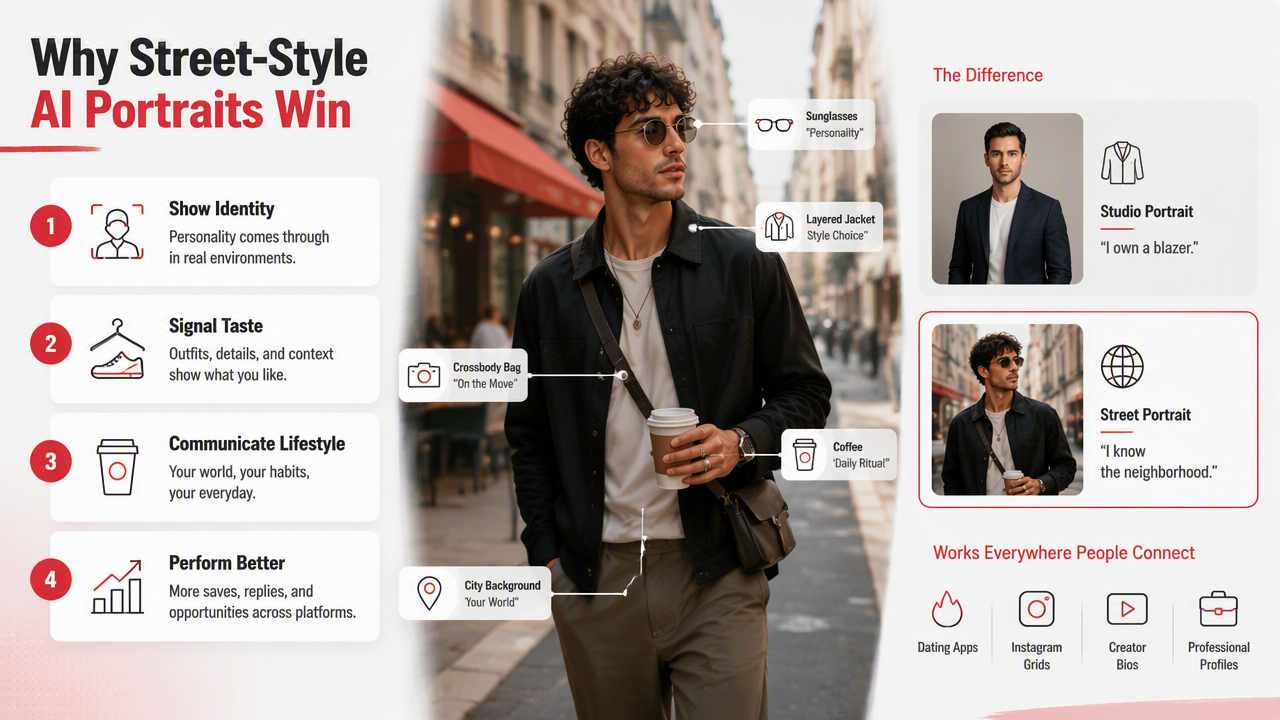
A studio portrait says, "I own a blazer." A street portrait says, "I know where to wear it." That extra context helps viewers imagine your social life, style, and confidence. For dating profiles, I'd rather use one believable city shot than five bathroom mirror photos doing emotional damage to the tiles.
Generative image tools have improved partly because model architectures and training methods have matured. Aggarwal, Mittal, and Battineni explain the theory and applications of generative adversarial networks in a 2021 overview in International Journal of Information Management Data Insights. StyleGAN, introduced by Nvidia researchers in 2018, helped popularize high-quality image synthesis, although modern tools use several model families beyond classic GANs.
Best profile uses by goal
| Goal | Best street-style look | Why it works |
|---|---|---|
| Tinder or Hinge | Golden-hour sidewalk portrait | Feels warm, social, and approachable |
| Night flash photo near neon signs | Adds energy without needing a caption novel | |
| LinkedIn-lite personal brand | Clean coat, city architecture, soft daylight | Looks polished but not corporate-stiff |
| Creator profile | Graffiti wall, layered outfit, confident pose | Signals taste, niche, and visual identity |
| Fantasy or glam portrait | Rainy street, cinematic coat, dramatic backlight | Creates a movie-poster mood without a movie budget |
Pick one main use before generating. A dating image should invite conversation; a creator image should signal style; a professional image should reduce visual noise.
How do you create realistic AI street style photos?
To create realistic AI street style photos, use a sharp source selfie, define a believable city scene, choose clothing that fits your real style, specify lighting, generate several variations, then reject images with odd hands, warped logos, plastic skin, or impossible shadows.
- Start with a clear selfie. Use good lighting, a neutral expression, and visible face shape.
- Choose a real-world setting. Try SoHo crosswalk, Shibuya alley, London brick street, Paris cafe exterior, or downtown rooftop.
- Match outfit to location. A trench coat fits rainy streets; a varsity jacket fits campus blocks.
- Add camera language. Use "35mm lens," "candid," "street photography," or "natural depth of field."
- Generate multiple options. One lucky image is not a workflow.
- Check realism before posting. Faces, fingers, text, reflections, and shadows are the usual suspects.
Research on deep learning and data scarcity by Alzubaidi, Bai, and Al-Sabaawi in the Journal of Big Data discusses challenges that affect model performance when data is limited or uneven. For users, that means reference quality matters. Feed the tool a blurry selfie and it may return a beautifully dressed stranger with your cheekbones on loan.
Realism test: if the image would make a friend ask "where was this taken?" instead of "which app made this?", you're close.
Candid photo checklist
- Keep the pose slightly imperfect: walking, looking aside, adjusting a jacket, holding coffee.
- Use one hero detail: sunglasses, boots, leather jacket, tote bag, or layered coat.
- Avoid overloading the prompt with ten aesthetics at once.
- Ask for natural skin texture, not airbrushed skin.
- Keep backgrounds recognizable but not chaotic.
- Crop like a phone photo or street photographer, not a passport booth.
The small flaws make the image believable. Perfect symmetry is where charm goes to file a complaint.
Street-style prompt ideas by background, outfit, and lighting
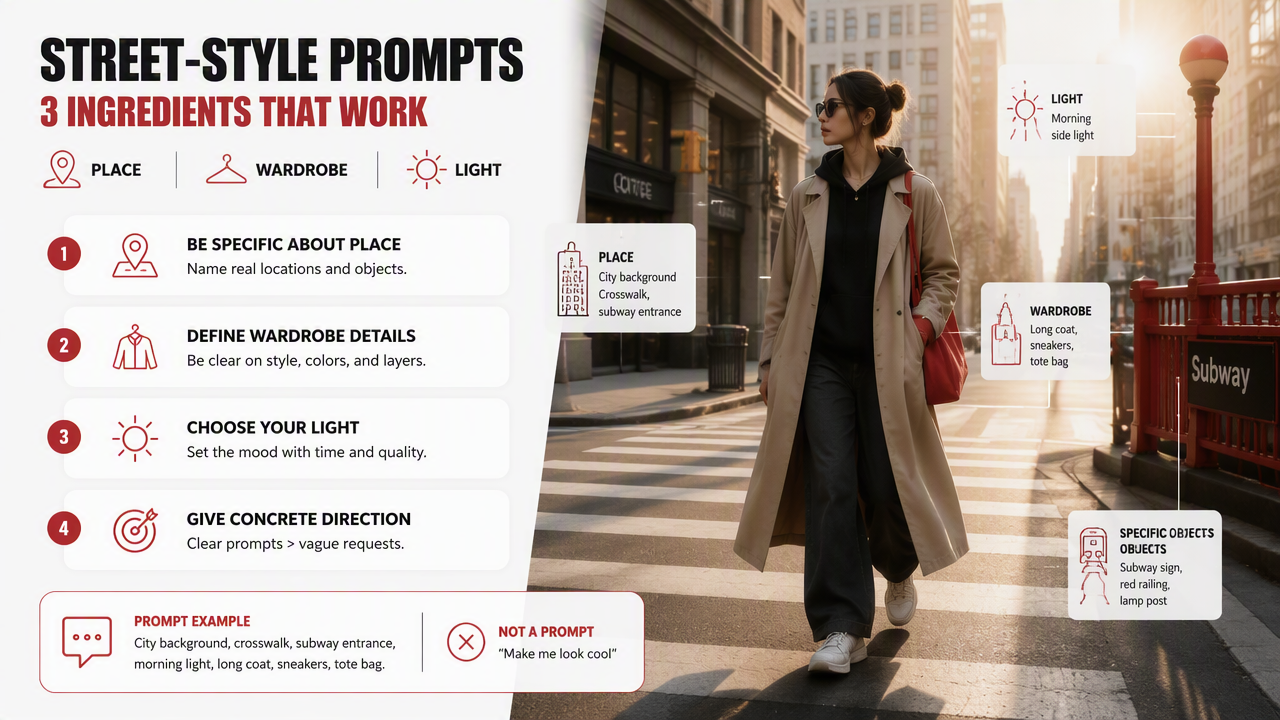
Strong street-style prompts combine three ingredients: place, wardrobe, and light. The best results usually come from concrete creative direction, not vague requests like "make me look cool," which is less a prompt and more a cry for help.
Prompt building blocks for city portraits
| Element | Options to try | Prompt example |
|---|---|---|
| City background | Crosswalk, subway entrance, cafe exterior, rooftop, mural wall | "walking past a small coffee shop on a rainy city street" |
| Outfit | Oversized coat, streetwear hoodie, denim jacket, tailored suit, leather jacket | "wearing a black wool coat, white tee, relaxed trousers" |
| Lighting | Golden hour, overcast daylight, neon night, camera flash, soft window spill | "cinematic neon lighting, realistic shadows" |
| Camera style | 35mm, candid street photography, shallow depth, editorial lifestyle | "shot on a 35mm lens, candid fashion photo" |
| Mood | Effortless, confident, relaxed, mysterious, playful | "relaxed expression, mid-step, not posing directly" |
A good full prompt might be: "Candid street-style portrait of me walking through a rainy downtown crosswalk, black trench coat, white sneakers, soft evening reflections on pavement, 35mm street photography, natural skin texture, realistic hands, shallow depth of field."
For a dating app, soften the intensity: "Approachable candid portrait outside a neighborhood cafe, casual denim jacket, warm daylight, slight smile, natural posture." For personal branding, clean it up: "Modern city architecture background, tailored navy coat, confident but relaxed expression, editorial lifestyle photo."
How HotphotoAI handles street-style portraits
The HotphotoAI platform is useful when you want street-style portraits that look made for profiles, not abstract wall art. Competitors like PhotoGPT focus on street-style AI images, Adobe Firefly is often positioned around broader street-style art, and fashion tools like Claid or Botika serve product and ecommerce workflows. Personal portrait users need a different standard: the face has to stay recognizably you.
HotphotoAI fits best when your goal is attractive personal imagery for dating, social media, creator pages, or lifestyle branding. Instead of thinking like a fashion catalog, think like a mini photo session: several looks, several backgrounds, and one consistent identity.
Which tool direction fits your goal
| User need | Better fit | Reason |
|---|---|---|
| Better dating photos | Personal AI portrait generator | Prioritizes face, attractiveness, and profile context |
| Urban art concepts | General art generator | Better for murals, graffiti, and illustration styles |
| Ecommerce fashion images | Product photography AI | Built around garments, flat lays, and catalog consistency |
| Creator lifestyle shots | Personal portrait workflow | Balances realism, style, and repeatable looks |
Use with HotphotoAI when you want controlled variations: one cafe look, one night-street look, one clean city-branding look, and one slightly dramatic "yes, I own a coat" shot. If you're comparing options, head to hotphotoai.com after you've picked the outfits and scenes you want to test.
FAQ: AI street style photo generator basics
Street-style AI portraits are easiest to use well when you treat them like a real shoot with better logistics. These quick answers cover the practical questions I hear most.
Can AI street style photos be used on dating apps?
Yes, AI street style photos can work on dating apps if they still look like you and show believable lifestyle context. Use them as part of a mixed profile, not as the entire lineup. Keep at least one recent real photo so matches don't feel tricked when you meet.
What makes an AI street portrait look fake?
The biggest giveaways are glossy skin, strange fingers, unreadable text, warped building lines, and outfits that don't match the setting. Overly cinematic lighting can also look suspicious. If the image feels like a perfume ad for a person who never sweats, reduce the drama.
Which backgrounds are best for street-style portraits?
The safest backgrounds are city sidewalks, cafe fronts, subway entrances, brick streets, rooftops, and crosswalks. They add story without stealing attention from your face. Avoid extremely famous landmarks unless travel is part of the point, since they can make the image feel staged.
How many images should I generate before choosing one?
Generate enough variations to compare expression, pose, clothing, and realism. I usually prefer a small set with different scenes rather than dozens of near-identical outputs. Choose the image that looks like a great day in your life, not a fake campaign for sunglasses.
Conclusion
A strong AI street style photo generator helps you turn one ordinary selfie into profile photos with taste, setting, and social proof. Start with a clean source image, choose a city scene that fits your real personality, use outfit and lighting prompts with restraint, then run the realism checklist before posting. If you want profile-ready street portraits without organizing a shoot, try HotphotoAI and visit hotphotoai.com with three looks in mind: casual dating, polished personal brand, and cinematic city night.