AI Studio Photoshoot at Home: A 2026 Guide to Better Portraits
TL;DR
For the best home AI portraits, start with 10 to 20 clear selfies, vary angles and lighting, then choose one visual goal before generating images. Use AI for polished dating, creator, professional, or fantasy looks, but review every output for face accuracy, hand issues, and over-edited skin.
A real studio is lovely, but so is not hauling three outfits across town like a glamorous pack mule. An AI studio photoshoot at home lets you turn everyday selfies into polished portraits for dating apps, LinkedIn, social profiles, creator pages, and stylized personal projects using image-generation software such as HotphotoAI. AI studio photoshoot: a remote portrait workflow where source selfies, style choices, and generative AI replace the camera, backdrop, wardrobe rack, and lighting rig of a traditional shoot.
Table of Contents
What is an AI studio photoshoot at home?
An AI studio photoshoot at home is a portrait-making process where you upload personal photos, select a style, and generate studio-like images without hiring a photographer or visiting a set. The best results come from strong source selfies, clear style direction, and a final review for realism before posting.
Key insight: AI can imitate studio lighting, outfits, poses, and backgrounds, but your input photos still decide whether the final portrait looks like you or your oddly confident cousin.
This workflow is different from simple filters. Filters modify one photo; AI portrait systems create new images based on your face, style preferences, and prompts. That makes them useful for professional headshots, dating profile photos, lifestyle images, cosplay-inspired portraits, and model-style shoots.
The research around appearance still matters. A 2022 PLoS ONE study by Tomohiro Arai and Hiroshi Nittono examined how cosmetic makeup enhances facial attractiveness and affective neural responses, which supports a practical point: styling choices such as grooming, contrast, and facial clarity affect how portraits are perceived.
How do you prepare source selfies for AI portraits?
You prepare source selfies for AI portraits by giving the model clear, varied, recent photos of your face in natural conditions. Use different angles, expressions, and lighting, but avoid heavy filters, sunglasses, group shots, and extreme crops because they reduce identity accuracy.
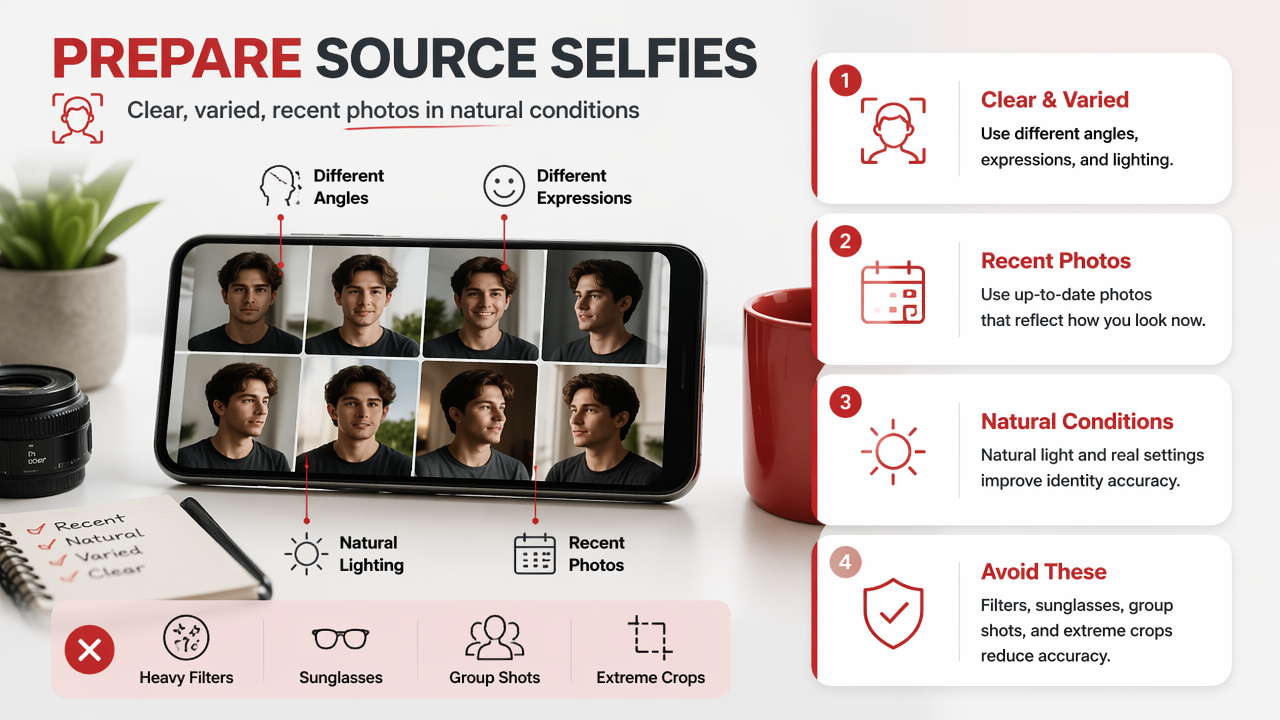
Source photo checklist
| Input type | Use it? | Why it matters |
|---|---|---|
| Front-facing selfie | Yes | Teaches core facial structure |
| Three-quarter angle | Yes | Improves pose variety |
| Natural daylight photo | Yes | Preserves skin tone and detail |
| Heavy beauty filter | No | Can train fake texture and distorted features |
| Sunglasses or hats | No | Hides identity markers |
| Old photo from years ago | Avoid | May not match your current look |
I'd rather upload fewer clean photos than a messy pile of 80 mystery files from the camera roll. AI is powerful, not psychic.
- Pick recent photos from the past year.
- Include 10 to 20 images if the tool asks for a training set.
- Mix smiles, neutral expressions, and slight head turns.
- Use photos where your face is sharp and well lit.
- Crop out other people before uploading.
- Remove duplicates, screenshots, and low-resolution images.
For a simple first run, the HotphotoAI platform is a good fit because it focuses on turning personal photos into polished portrait styles without needing a full production setup. You can plan the look first, then head to hotphotoai.com when your source images are ready.
Which outfits, backgrounds, and styles work best?
The best outfits, backgrounds, and styles are the ones that match the job your portrait has to do. A dating image should feel approachable, a professional headshot should feel credible, and a fantasy or glamour image can be more dramatic as long as your face remains recognizable.
Think in scenes, not costumes. "Black blazer, soft window light, warm gray studio background" gives the AI a clearer target than "make me look rich." One sounds like a photoshoot brief; the other sounds like a cursed genie request.
Style planning matrix
| Goal | Outfit direction | Background | Lighting cue |
|---|---|---|---|
| Dating profile | Fitted casual, clean colors | Cafe, street, soft studio | Warm natural light |
| LinkedIn or resume | Blazer, knit, button-down | Neutral studio or office | Soft frontal light |
| Creator profile | Trend-forward outfit | Color backdrop or lifestyle set | High contrast or cinematic |
| Glamour portrait | Dress, suit, metallics, styled hair | Editorial studio | Beauty light, rim light |
| Fantasy or cosplay-inspired | Character-coded wardrobe | Castle, neon city, forest | Dramatic directional light |
Wikipedia describes cosplay as performance art where participants wear costumes and accessories to represent a character. That idea translates well to AI portraits: strong character signals, like armor, cyberpunk jackets, or royal styling, work better than vague "fantasy" prompts.
Research on AI creativity is also useful here. A 2024 arXiv paper by Li-Chun Lu, Shou-Jen Chen, and Tsung-Min Pai studied large language models using discussion and role-play frameworks. For portrait prompting, role-based thinking helps: write as if briefing a fashion photographer, stylist, and lighting director at once.
Try this compact prompt format:
- Role: editorial portrait photographer
- Subject: keep my face accurate and natural
- Wardrobe: navy blazer, white shirt, minimal jewelry
- Setting: modern studio, warm gray background
- Lighting: softbox from front left, gentle shadow
- Mood: confident, relaxed, premium but not stiff
What mistakes make AI portraits look fake?
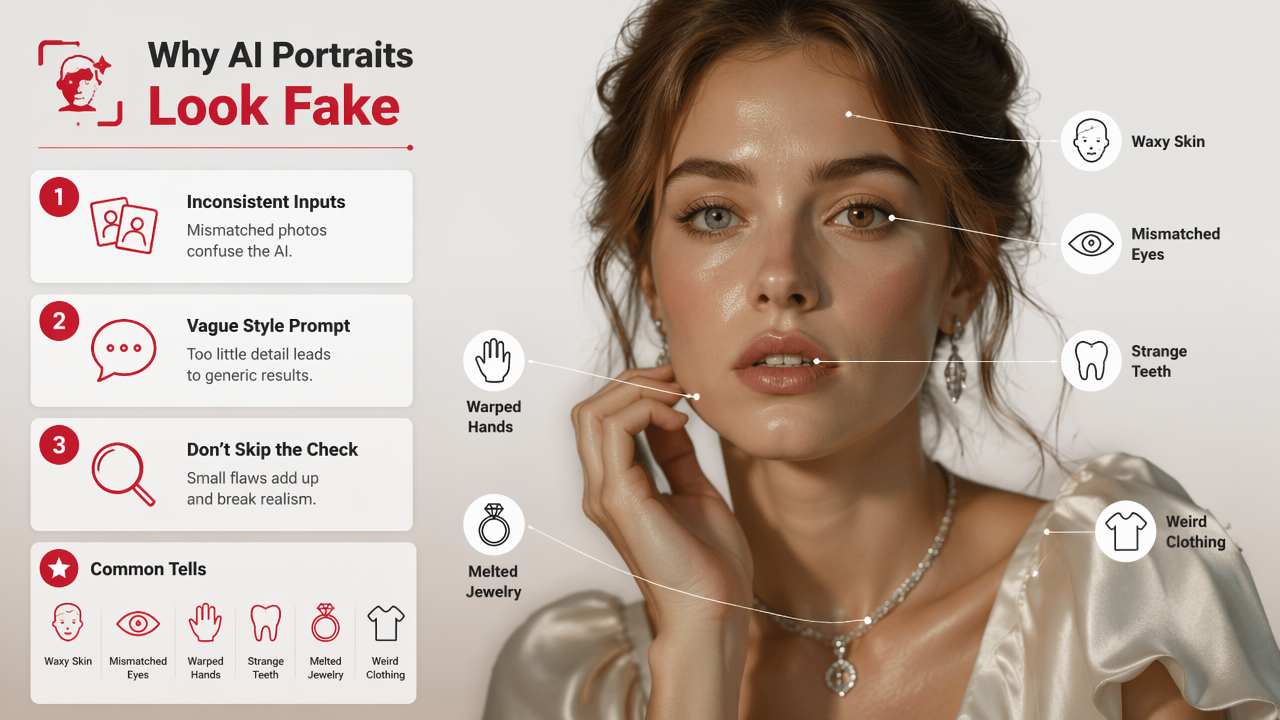
AI portraits look fake when the input photos are inconsistent, the style prompt is too vague, or the final image is accepted without checking details. Common tells include waxy skin, mismatched eye color, warped hands, strange teeth, melted jewelry, and clothing that changes shape for no earthly reason.
Quality control list before posting
- Zoom in on the eyes, teeth, fingers, ears, and hairline.
- Check whether moles, freckles, scars, and face shape still match you.
- Make sure glasses, earrings, collars, and buttons follow real-world geometry.
- Reject images where skin looks plastic or the jawline looks borrowed.
- Avoid using only AI images on dating profiles; mix in real candid photos.
- Ask one honest friend, not five polite friends, if the image still looks like you.
Rule of thumb: If the portrait needs a paragraph of explanation, don't make it your main profile photo.
The biggest misconception is that more styling always means better results. It doesn't. A clean headshot with believable lighting often outperforms a dramatic mansion background where your hand appears to be negotiating with your sleeve.
Privacy deserves a calm check, too. Before uploading face photos anywhere, review the platform's terms, deletion options, and account controls. Personal images are sensitive data, so treat source selfies like documents, not throwaway memes.
How should you use AI portraits in 2026 and beyond?
You should use AI portraits in 2026 as polished profile assets, not as a total replacement for reality. The strongest approach is to create several believable options, choose images that match your current appearance, and use them alongside candid photos, work samples, or real lifestyle images.
For dating apps, lead with an image that looks natural and current. Use the sharper studio-style portrait as photo one or two, then support it with photos that show hobbies, social context, and full-body framing. Attractive is good; believable gets the message.
For professional profiles, keep edits conservative. A clean background, direct eye contact, and simple wardrobe will usually beat a dramatic cinematic look. If your job involves clients, hiring, or public trust, your AI headshot should reduce friction, not announce that you just discovered lasers.
With HotphotoAI, I'd start by generating one realistic set and one more stylized set, then compare them side by side. The realistic set can serve LinkedIn, resumes, and websites; the stylized set can support creator profiles, social banners, or personal branding experiments.
Quick decision guide
| If you need | Choose | Avoid |
|---|---|---|
| More matches | Warm lifestyle portraits | Overly perfect model shots |
| A better headshot | Neutral studio style | Wild backgrounds |
| Creator visuals | Editorial or cinematic sets | Random styles with no theme |
| Fantasy images | Character-led prompts | Vague "make it epic" prompts |
Looking toward 2027, expect home portrait tools to become more interactive. Instead of generating a batch and hoping for the best, users will likely adjust pose, wardrobe, lighting, and background in smaller steps. That shift will make taste more valuable than technical skill, which is excellent news for everyone except the cursed-genie prompt writers.
FAQ
Can AI photos replace a real studio photoshoot?
AI photos can replace a basic studio session for profile pictures, social media portraits, and concept images, especially when budget or time is tight. They are less suitable when you need documentary accuracy, team consistency, print campaign control, or legally sensitive commercial work. For most personal profiles, a mixed set works best.
How many selfies do I need for good AI portraits?
Most users should prepare 10 to 20 strong selfies if the platform trains on multiple images. Quality matters more than volume. Use clear, recent, well-lit photos with different angles and expressions. Avoid filters, sunglasses, group photos, and blurry images because they teach the AI the wrong visual information.
Are AI portraits good for Tinder or dating apps?
AI portraits can work well on dating apps when they look like a polished version of your real self. The safest strategy is to use one strong AI-generated portrait with several real photos that show your everyday appearance, hobbies, and body type. Over-styled images can feel impressive but less trustworthy.
What is the fastest way to start?
Pick your goal first: dating, professional, glamour, creator, or fantasy. Gather clean selfies, choose one style direction, and generate a small test set before making dozens of variations. If you want a guided portrait workflow, visit hotphotoai.com and start with a realistic style before experimenting.
Conclusion
A strong AI studio photoshoot at home starts before you click generate: clean source selfies, a clear visual goal, believable styling, and strict quality control. Start with one practical portrait set, review it like a mildly suspicious art director, then create bolder versions once the face, lighting, and wardrobe feel right. Your next step: gather 10 clean selfies tonight and build one realistic profile-ready set before experimenting with glamour or fantasy styles.