Online Talking AI From Portrait Photo: How It Works and When to Use It
TL;DR
Online talking AI from portrait photo tools turn one clear face image plus text or audio into a short lip-synced video. Use them for intros, social posts, profile content, and light personal branding, but keep consent, realism, and disclosure in mind.
A single portrait can now smile, blink, and deliver a script without booking a studio, bribing a friend with coffee, or pretending your living room has cinematic lighting. Online talking AI from portrait photo tools sit between AI portrait generators and full video editors: they animate an existing face and sync it to speech. If you first need a polished portrait, HotphotoAI can help create styled images before you animate them elsewhere.
Talking photo AI: software that turns a still portrait into a short video by generating facial motion, eye movement, head movement, and lip sync from text or audio.
Table of Contents
What is online talking AI from portrait photo?
Online talking AI from portrait photo is a browser-based workflow that turns a still face image into a short speaking video using generated motion and synchronized audio. The user usually uploads a portrait, types a script or adds a voice track, then exports a clip for social media, presentations, dating profiles, or personal branding.
The key idea is simple: the photo provides identity and appearance, while the model predicts motion. Research on generative adversarial networks explains how generative systems can create new visual outputs from learned patterns, while a survey of deep multimodal learning covers how vision and other signals, such as audio, can be combined in computer vision systems.
Key insight: a talking-photo clip is not a video recording. It is a generated performance based on a still image, a voice input, and a motion model.
Common inputs and outputs
- Input image: a clear portrait, usually one visible face.
- Speech source: typed text, uploaded audio, or selected synthetic voice.
- Generated motion: mouth shapes, blinks, micro-expressions, and small head movement.
- Export: a short video file for TikTok, Reels, YouTube Shorts, LinkedIn, landing pages, or messaging.
Creators like the format because it is fast. Professionals like it because it can make a profile feel less static. Dating app users like it because, frankly, one good talking intro can beat six photos of someone holding a fish.
How do talking-photo tools turn one portrait into video?
Talking-photo tools animate a portrait by detecting facial landmarks, mapping speech to mouth shapes, generating small facial movements, and rendering the result as a video. Most online tools hide the technical stack, but the visible workflow is usually quick enough for non-editors to use without opening a timeline editor.
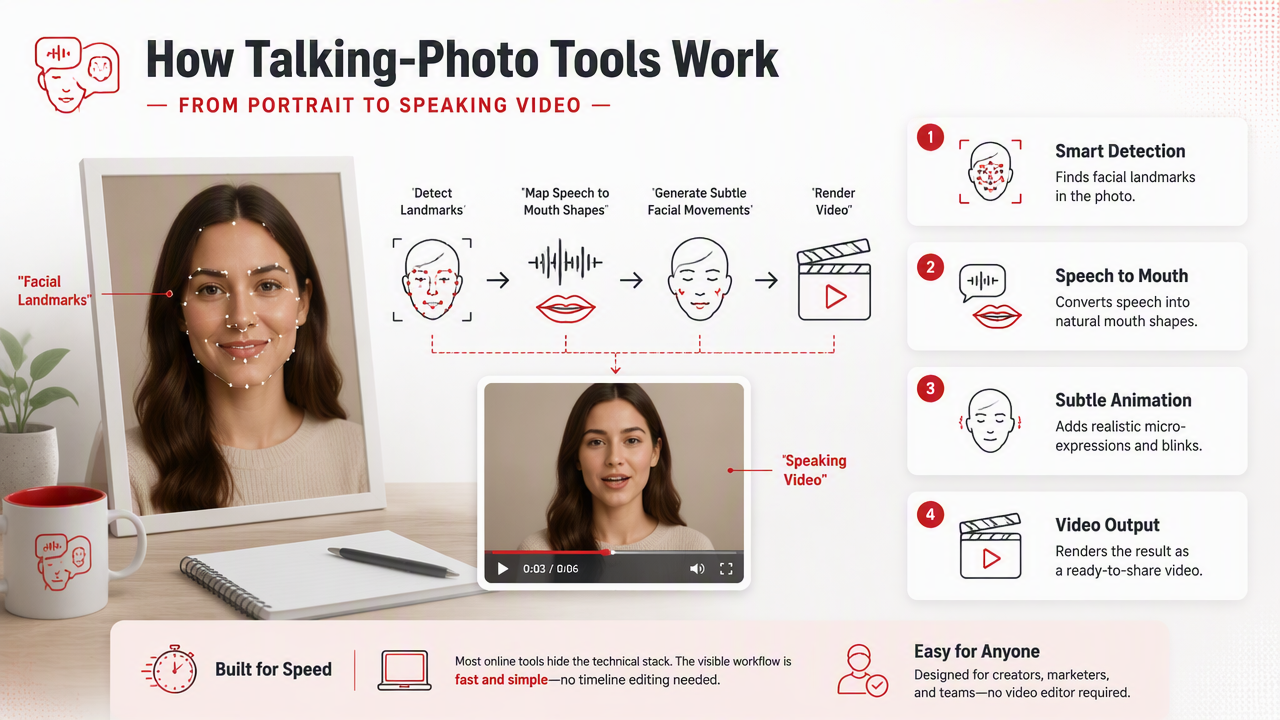
The typical creation workflow
- Choose a portrait with a front-facing face and clean lighting.
- Upload the image to the talking-photo tool.
- Add speech by typing text, selecting a voice, or uploading audio.
- Preview the animation to check lip sync, expression, and framing.
- Export the clip in the size needed for your platform.
The best tools also let you control language, voice tone, subtitles, aspect ratio, and background treatment. That matters because a LinkedIn intro and a fantasy-style creator post should not look like they escaped from the same template factory.
Where each AI image tool fits
| Tool type | Main job | Best use | Watch for |
|---|---|---|---|
| AI portrait generator | Creates a new styled image from prompts or selfies | Dating photos, glamour portraits, creator headshots | Likeness consistency |
| Talking avatar tool | Animates a face to speak | Explainer clips, intros, short social videos | Robotic delivery if the script is stiff |
| Deepfake-style tool | Swaps or imitates identity in generated media | Film effects, parody with permission, research | Consent and impersonation risk |
| Video editor | Cuts, captions, resizes, and packages content | Final publishing workflow | Manual editing time |
A practical stack is simple: create or improve the still portrait first, animate it second, then edit captions and format last. The HotphotoAI platform is useful at the portrait stage when you want a cleaner, more stylized source image before making it speak.
What photos work best for AI talking portraits?
The best photos for AI talking portraits show one clear face, sharp eyes, natural lighting, and an unobstructed mouth. A strong input image gives the model cleaner facial landmarks, which usually improves lip sync, expression, and the feeling that the video belongs to the person in the portrait.
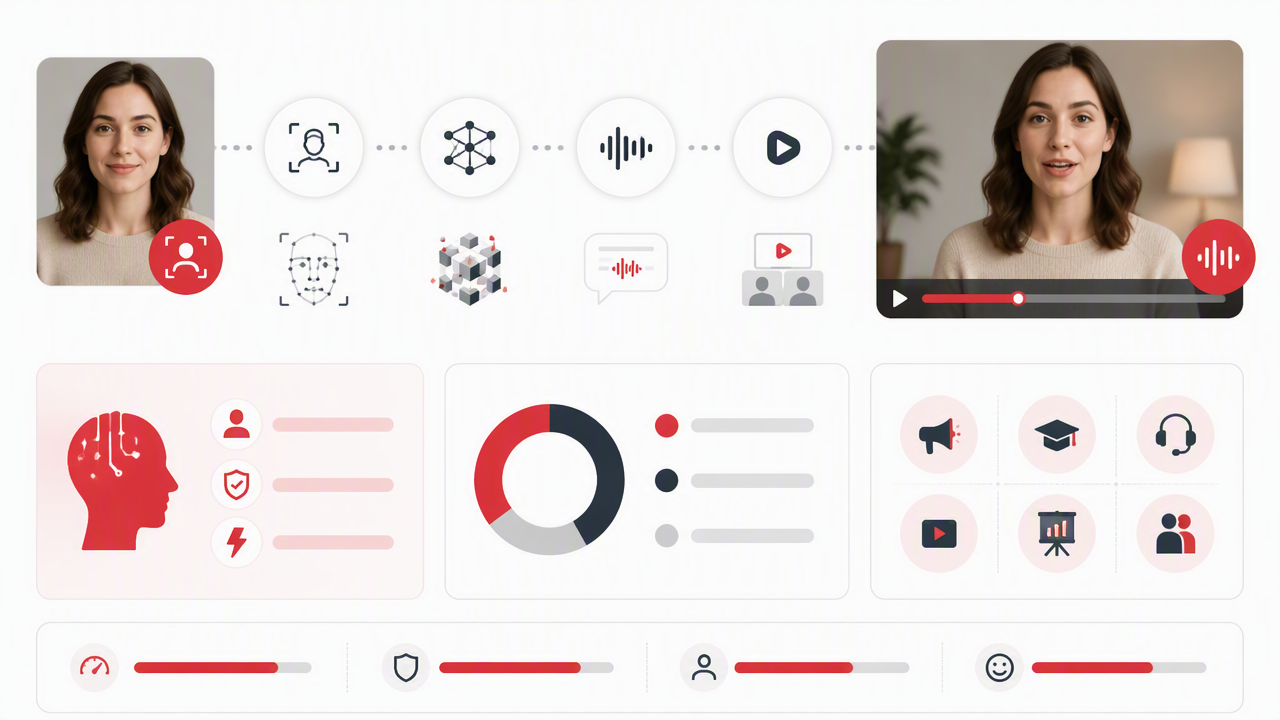
Portrait checklist before you animate
- Use a front-facing or slightly angled headshot.
- Keep the mouth visible, with no hand, microphone, scarf, or heavy shadow covering it.
- Pick a photo with even lighting across the face.
- Avoid extreme filters that reshape facial features.
- Crop with enough room around the head for natural motion.
- Use a higher-resolution image when possible, since blurry inputs give the model less to work with.
Strong talking-photo videos start before the animation step. If the portrait looks like it was taken during an earthquake, AI can only do so much cleanup.
Better scripts make better avatars
Short scripts usually outperform long monologues. Aim for one idea per clip, especially for vertical social video. A 10-second intro, quick profile pitch, or single product message feels natural; a two-minute speech from a frozen head can feel like a hostage note with lip sync.
For personal branding, I'd write the script the way you speak, not the way a corporate brochure wheezes. Use contractions, direct verbs, and a warm opening. For dating profiles, keep it casual: one line about who you are, one specific interest, and one easy conversation hook.
Where do creators and professionals use talking portraits?
Creators and professionals use talking portraits when they need a low-friction video presence without filming a fresh clip. The format works best for short, clear messages: profile intros, campaign teasers, educational snippets, product explainers, language versions, and stylized character content.
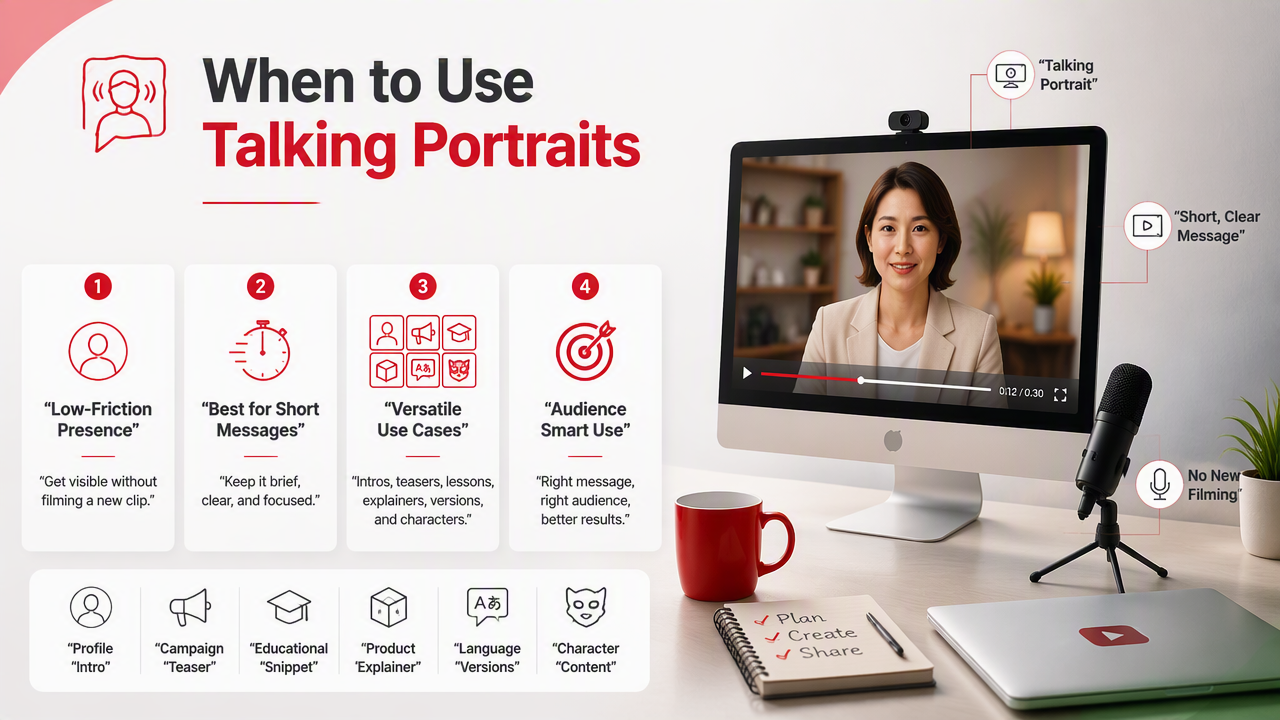
Use cases by audience
| Audience | Smart use | Example |
|---|---|---|
| Dating app users | Profile intro or icebreaker | "I make excellent pasta and terrible puns." |
| Creators | Short character-led posts | A fantasy portrait narrates a story hook |
| Professionals | Polished intro clip | A consultant summarizes their service in 15 seconds |
| Educators | Quick lesson opener | A historical portrait introduces a topic |
| Social teams | Localized video variants | Same visual, different languages or captions |
HotphotoAI fits the creative prep stage for people who want glamour, lifestyle, model-style, or fantasy portraits before animation. That can be especially useful when your camera roll contains three good selfies and 400 screenshots of parking receipts.
Consent and safety boundaries
Talking-photo AI should be used with clear permission when a real person is recognizable. A 2022 paper on risks posed by language models examined broader harms around generated content, including misuse risks that matter when synthetic media can sound or appear persuasive.
Practical rules are easy to remember:
- Animate your own image or content you have rights to use.
- Do not make someone appear to say things they never approved.
- Label synthetic or AI-assisted media when context could confuse viewers.
- Avoid political, medical, financial, or legal claims from a generated face unless reviewed carefully.
Safe use is not boring. It just keeps the fun from wandering into "please explain this to a lawyer" territory.
FAQ about AI talking photos
AI talking-photo tools are easiest to understand when you separate the image, the voice, and the intended use. These answers cover the questions that matter before you upload a face and press generate.
Can I make any portrait talk online?
You can animate many portraits online, but quality depends on face clarity, pose, lighting, and whether the tool supports that image type. A single visible face works best. Group photos, covered mouths, extreme angles, heavy blur, and highly stylized art may produce weaker motion or lip sync.
Is a talking photo the same as a deepfake?
A talking photo is not automatically a deepfake. It becomes deepfake-style when it impersonates a real person or makes them appear to say something they did not say. The safer framing is consent-based animation: use your own portrait, approved brand assets, licensed characters, or clearly fictional images.
Can talking portraits help dating profiles?
Yes, if the clip feels authentic and short. A talking portrait can add personality to a dating profile, especially when paired with strong photos. Keep the message casual, avoid overproduced bragging, and use the video as an opener rather than a full autobiography with cheekbones.
What should change in 2027?
Expect more natural expressions, better multilingual lip sync, stronger watermarking, and clearer platform rules around synthetic identity. The biggest improvement will likely be control: creators will want to adjust emotion, pacing, camera crop, and disclosure without needing a professional video workflow.
Conclusion
Online talking AI from portrait photo tools are best when you treat them as short-form communication, not a magic replacement for real presence. Start with a strong portrait, write a human-sounding script, disclose synthetic media when needed, and use the format for clear, specific moments.
For your next clip, prepare one polished portrait, write a 10-second script, test two voice styles, and export one vertical version. If you need better source images before animating, visit hotphotoai.com and build a portrait that gives the talking-photo tool something worth bringing to life.