Profile Pic Size Guide for 2026: Best Dimensions, Crops, and Face Framing
TL;DR
Use a 1080 x 1080 square image as your master profile photo, then crop it for each platform instead of uploading tiny files. Keep your face centered, leave headroom, and export a clean JPG or PNG so circles, thumbnails, and dating app previews do not turn your best shot into forehead confetti.
A great profile photo can survive bad lighting, weird crops, and app compression only if the original file gives it room to breathe. The safest profile pic size in 2026 is a high-resolution square, usually 1080 x 1080 pixels, because most platforms display profile images as circles or small thumbnails. Profile pic size: the pixel dimensions, aspect ratio, and crop area used to display your avatar on social media, dating apps, professional networks, and messaging profiles. If you are creating new photos instead of resizing old ones, HotphotoAI can help generate polished, platform-ready images with enough resolution and framing for clean cropping.
Table of Contents
What is the best profile pic size in 2026?
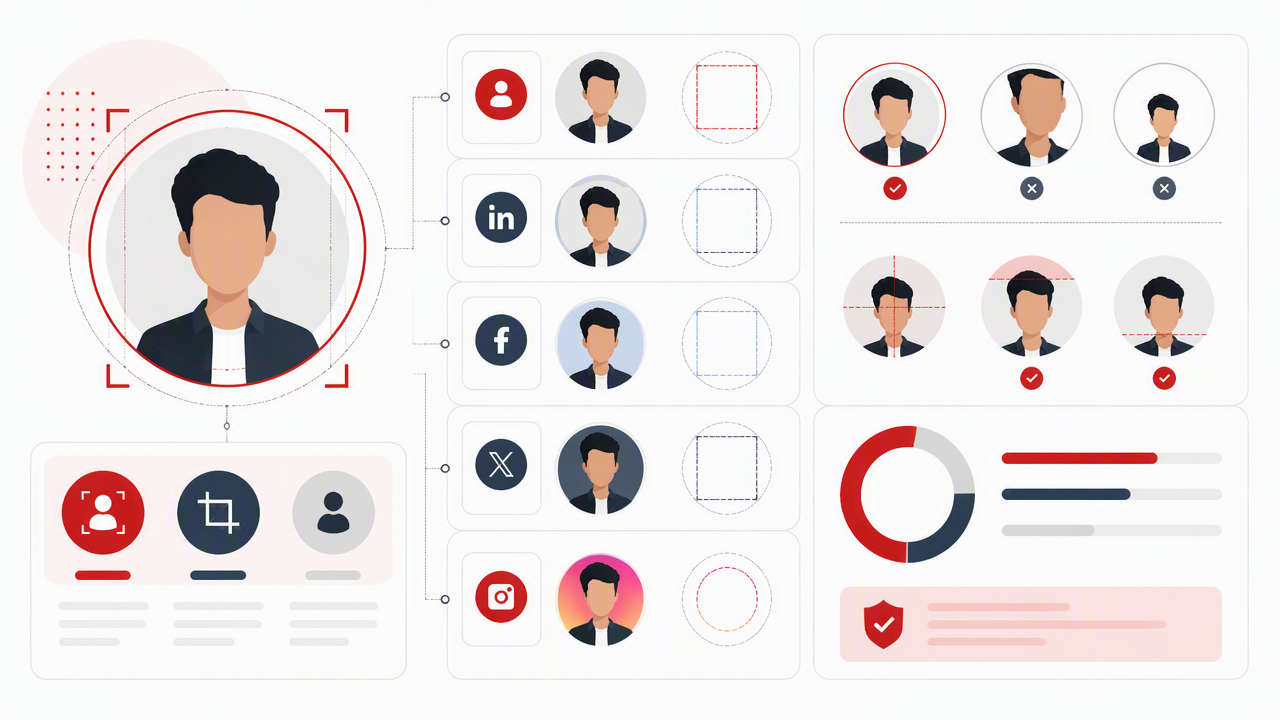
The best profile pic size in 2026 is 1080 x 1080 pixels in a 1:1 square format, saved as a high-quality JPG or PNG. That size is large enough for Instagram, Facebook, LinkedIn, TikTok, X, YouTube, and dating apps, while still cropping cleanly into circular previews.
Most apps do not show your uploaded image at full size. They shrink it, crop it, compress it, and sometimes display it inside a circle. That is why the upload file matters more than the tiny number shown on screen.
Key insight: upload bigger than the display size, but frame as if the corners will disappear.
For example, SERP data for Facebook references a minimum of 180 x 180 pixels, while another 2025 result recommends 1080 x 1080 for Facebook profile photos. Instagram references vary too, with snippets listing 110 x 110 pixels as the visible profile size and 320 x 320 pixels as a recommended profile image size in 2026. The practical answer is simple: build one large square master image, then crop copies for each platform.
Recommended avatar dimensions by platform
| Platform | Recommended upload | Aspect ratio | Display crop | Best framing tip |
|---|---|---|---|---|
| 1080 x 1080 px | 1:1 | Circle | Keep eyes slightly above center | |
| 1080 x 1080 px | 1:1 | Circle | Avoid text near edges | |
| TikTok | 1080 x 1080 px | 1:1 | Circle | Use bold contrast and close framing |
| 800 x 800 px or larger | 1:1 | Circle | Crop from chest or shoulders up | |
| X | 400 x 400 px or larger | 1:1 | Circle | Use a simple background |
| YouTube | 800 x 800 px | 1:1 | Circle | Make the face readable at small size |
| Tinder, Bumble, Hinge | 1080 x 1350 px or 1080 x 1080 px | 4:5 or 1:1 | App-dependent | Leave room above hair and below shoulders |
| WhatsApp, Telegram | 800 x 800 px or larger | 1:1 | Circle | Center the face, not the whole body |
How should you crop a profile photo for circles and thumbnails?
Crop a profile photo by centering the face, leaving 10 to 15 percent headroom, keeping the eyes near the upper third, and avoiding key details in the corners. Most platforms use circular masks, so square images need safe space around hair, shoulders, logos, and hands.
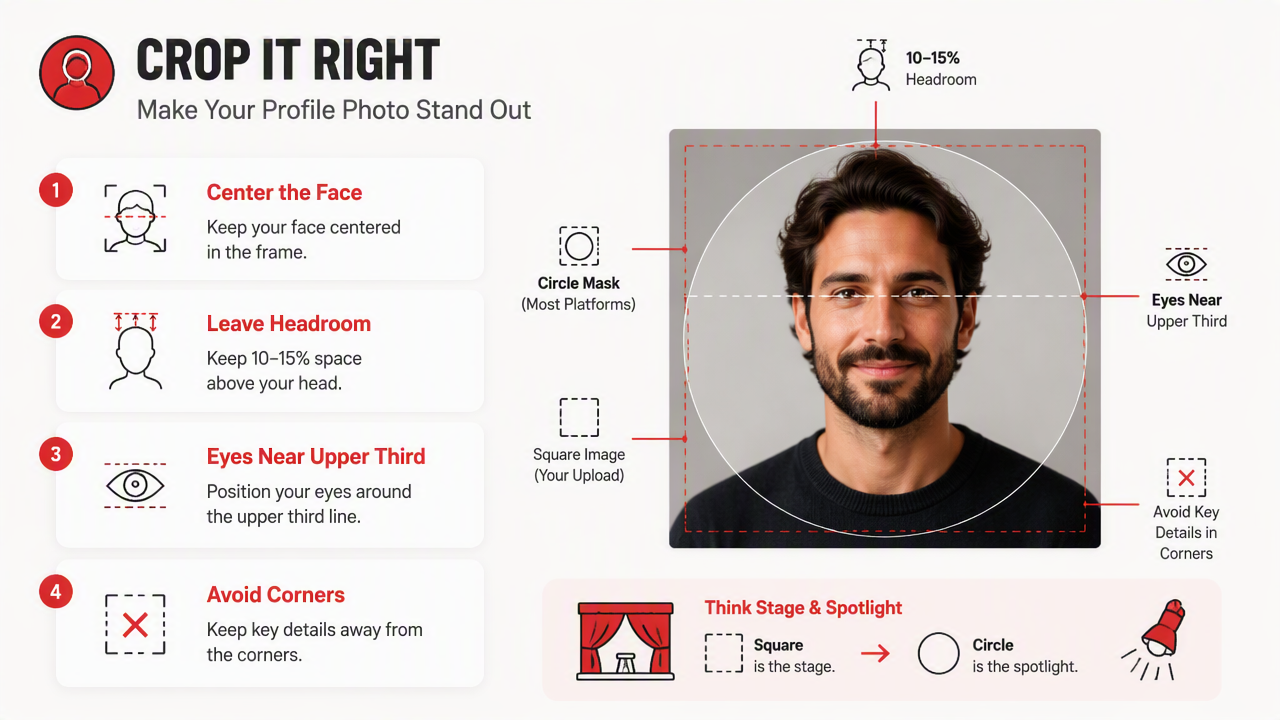
Think of the square as a stage and the circle as the spotlight. Anything outside the spotlight may vanish. The face should occupy enough space to be recognizable, but not so much that the chin or hairline gets clipped.
A good personal profile crop usually follows this order:
- Start with the highest-resolution original available.
- Set a square crop before uploading to social platforms.
- Place the eyes around the upper third line.
- Keep the nose and mouth near the vertical center.
- Leave margin around hair, hats, glasses, and shoulders.
- Preview the crop as a small circle before posting.
For dating apps, I prefer slightly more context than a tight headshot. A waist-up or chest-up photo gives people more personality cues: outfit, posture, setting, and style. For LinkedIn, the crop can be tighter because recognition and trust matter more than storytelling.
Safe-zone rules that prevent awkward cuts
- Face size: your face should fill about 55 to 70 percent of the circular crop.
- Headroom: leave visible space above hair, especially with curls, hats, or volume.
- Shoulders: include both shoulders when possible; it feels more balanced.
- Background: use contrast so the profile image reads at thumbnail size.
- Hands and props: keep them away from the edges unless they are central to the photo.
Tiny profile previews are ruthless. A photo that looks cinematic at full size can look like a mysterious beige dot after compression. Zoom out before you upload; if your face is still clear at postage-stamp size, you are in good shape.
Which file format and resolution should you upload?
Upload a clean JPG or PNG at 800 x 800 pixels minimum, with 1080 x 1080 pixels preferred for most personal profiles. JPG works well for photos, PNG works better for graphics or logos, and WebP may be accepted by some apps but is not always the safest upload choice.
Resolution is not just about sharpness. Higher-resolution originals give each platform more data to resize, which usually produces cleaner thumbnails. The trick is to avoid massive files that apps crush aggressively, because compression can make skin texture, hair, and text look crunchy.
Practical rule: export one master square at 1080 x 1080, then keep a backup of the uncropped original.
If you use the same image everywhere, save platform-specific copies with clear names like instagram-profile-1080.jpg, linkedin-headshot-800.png, and dating-primary-1080x1350.jpg. Future you will thank present you, perhaps with coffee.
Format choices for real-world uploads
| Format | Best for | Watch for | My recommendation |
|---|---|---|---|
| JPG | Real photos, dating profiles, lifestyle images | Can blur details after compression | Best default for most users |
| PNG | Logos, text, flat graphics | Larger file sizes | Best for brand avatars |
| WebP | Modern web images | Not accepted everywhere | Use only when the platform supports it clearly |
| HEIC | iPhone originals | May fail in some uploaders | Convert to JPG before posting |
Do not upload screenshots of profile photos if you can avoid it. Screenshots often carry lower resolution, interface artifacts, and odd color handling. Use the original image file instead.
How do AI-generated photos change profile sizing?
AI-generated profile photos work best when they are created larger than the final crop, with extra background around the head and shoulders. Ask for a square or vertical portrait at high resolution, then crop manually so the face survives circular previews, dating app cards, and small search results.
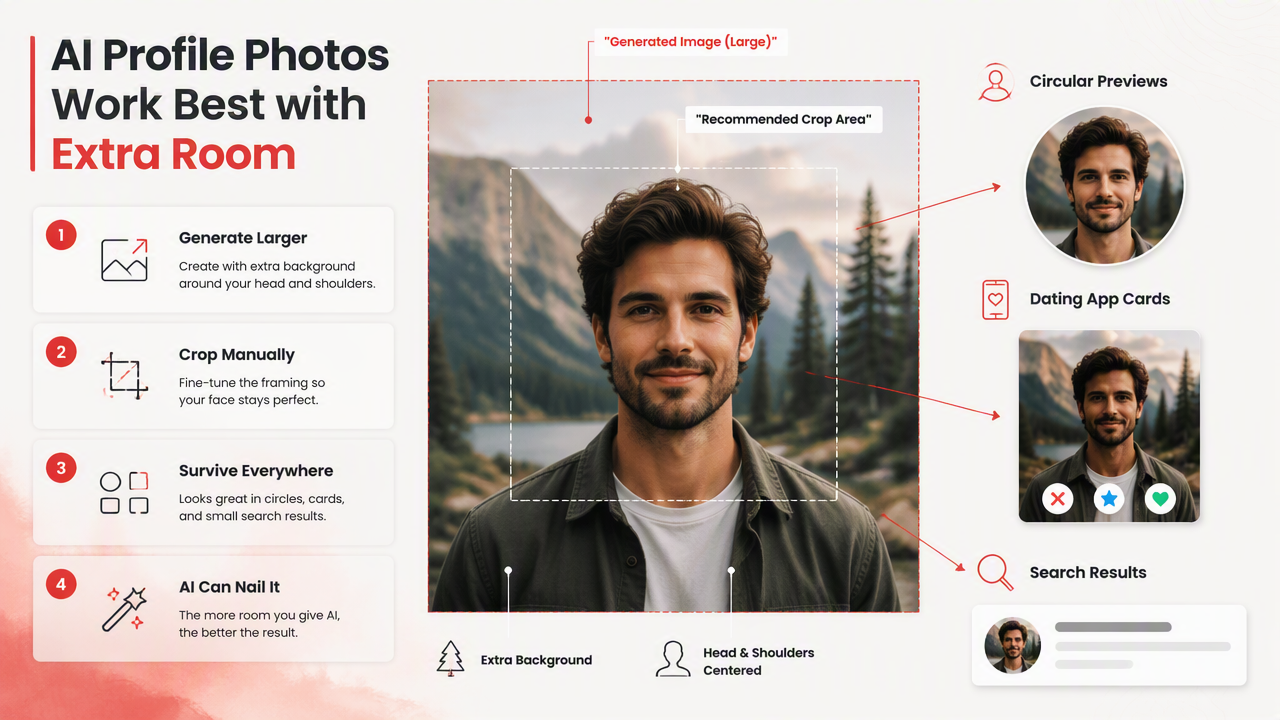
AI portraits can look fantastic, but sizing still matters. If the generated image is too tight, no editor can add real headroom without making the crop feel fake. I prefer generating a little wider than needed, then trimming down with intent.
For glamour, model-style, fantasy, or professional portraits, the HotphotoAI platform is most useful when you plan the final destination before generating. A LinkedIn portrait needs calm lighting and clean shoulders. A Tinder image can use more environment, style, and energy. A creator profile may need stronger colors that pop in a tiny circle.
Use prompts that mention framing directly:
- "Square portrait, head and shoulders, centered face, clean background, room above hair."
- "Professional profile photo, 1080 x 1080 crop safe, natural lighting, shoulders visible."
- "Dating app portrait, lifestyle setting, face clear, upper body visible, extra space for cropping."
- "Creator avatar, high contrast background, centered composition, circular crop safe."
A smart workflow is to generate multiple options, pick the most natural expression, then test it in circle and square previews. If the photo looks good in both, it will usually travel well across platforms.
AI-photo export checklist
- Generate at a high resolution, not a tiny avatar size.
- Choose square for social profiles and 4:5 for dating app lead photos.
- Keep both eyes visible and sharp.
- Leave margin above the hair and around shoulders.
- Export as JPG for realistic portraits.
- Save the original before cropping platform-specific versions.
When you want fresh looks without scheduling a studio session, HotphotoAI gives you enough style range to test outfits, lighting, and backgrounds before settling on the final crop.
What mistakes ruin profile photo sizing?
The most common sizing mistakes are uploading low-resolution files, cropping too close to the face, placing text or logos near the corners, and ignoring circular previews. A profile image should be designed for the smallest version people will see, not the full-size image in your camera roll.
Bad crops usually happen because people edit for beauty first and display second. That is backward. The app does not care that your jacket is perfect if it turns your face into a thumbnail blur.
Avoid these quick traps:
- Uploading a 180 x 180 file when a larger version exists.
- Using a full-body photo where the face becomes unreadable.
- Letting hats, hair, or glasses touch the crop edge.
- Adding tiny text that disappears on mobile.
- Reusing a group photo as a primary dating profile image.
- Cropping from a screenshot instead of the original file.
For professional profiles, skip heavy filters that change skin tone or facial structure. For dating apps, avoid images where the face is partly hidden by sunglasses, extreme shadow, or another person. Mystery is fun in novels, less so in thumbnails.
Fast pre-upload test
Before posting, shrink the image on your screen until it is about the size of a phone notification icon. If you can still recognize the face, expression, and overall vibe, the crop is working.
A good avatar passes the squint test: clear face, clean edges, simple background, no important detail trapped in the corners.
FAQ: Profile photo sizing questions
Is 1080 x 1080 good for every profile picture?
Yes, 1080 x 1080 is a strong master size for most profile pictures because it is large, square, and easy to crop. Some platforms display smaller versions, but uploading a larger square gives the app enough image data to resize cleanly.
Should my dating app photo be square or vertical?
A vertical 4:5 image often works better as a main dating app photo because it shows more body language, outfit, and setting. Keep a square crop ready too, since some apps and preview areas may crop your image differently.
Why does my profile picture look blurry after upload?
Blurry profile photos usually come from low-resolution originals, screenshots, heavy compression, or repeated editing and re-saving. Start with the original file, export a fresh JPG or PNG, and avoid uploading tiny display-size versions.
How much of my face should fill the crop?
Your face should usually fill about half to two-thirds of the circular profile area. Too small and people cannot recognize you; too close and the crop may cut off hair, chin, or shoulders.
Can I use AI photos for professional profiles?
Yes, AI-generated professional photos can work well when they look natural, are properly framed, and match your real appearance. Use clean lighting, simple backgrounds, and conservative styling for work profiles. For more profile-ready image options, visit hotphotoai.com.
Conclusion
The right profile pic size is not a tiny platform number; it is a smart master image that survives every crop. Start with 1080 x 1080 pixels, keep your face centered, leave safe space for circular masks, and export clean JPG or PNG copies for each app. If you want a polished set of portraits instead of stretching one old selfie across every profile, create several looks with HotphotoAI, test each one at thumbnail size, then upload the clearest winner. Your next step: open your current avatar, preview it as a small circle, and replace it if the face, expression, or crop is not instantly readable.