Profile Pictures: The 2026 Guide to Looking Like Yourself, Only Better
TL;DR
Use a clear face, good light, simple framing, and a believable expression before worrying about filters or style. For dating, social, and professional profiles, the best image should feel polished but still recognizably you.
A tiny square photo often does the job of a handshake, first date, business card, and vibe check all at once. Profile pictures work because people make fast judgments from faces, context, and visual consistency, so your image should answer one question quickly: "Can I trust this person enough to keep looking?" If you want a polished version without booking a studio, HotphotoAI can help create styled personal shots for dating, creator pages, and online profiles.
Table of Contents
What are profile pictures?
Profile pictures are personal images used to identify you on digital accounts, apps, and online communities. They may be real photos, illustrated icons, or AI-generated portraits, but their job is the same: make you recognizable, memorable, and appropriate for the platform.
Profile picture: a visual identity image attached to a user account, usually shown beside a name, post, message, or profile.
Avatar: in computing, an avatar is a graphical representation of a user, character, or persona, including icons used in forums, games, and online communities.
The word "avatar" matters because not every account photo has to be a literal headshot. A LinkedIn image should usually show your face. A gaming account may use a stylized character. A dating photo should show enough reality that meeting you later does not feel like a product recall.
Key insight: a good account image is not the fanciest image; it is the clearest visual answer to "who is this?"
Why your account image carries more weight in 2026
Online identity is now spread across dating apps, short-form video, private communities, AI tools, and immersive platforms. A 2022 paper on the metaverse by Dwivedi, Hughes, Baabdullah, and others examined how digital identity, presence, and interaction are changing across virtual environments (ScienceDirect).
That shift makes your main image more than decoration. It becomes a trust signal across places where people may meet you before they ever hear your voice. In 2026, the smartest choice is usually a photo that feels current, face-forward, and specific to the context.
What makes a strong profile photo?
A strong profile photo shows your face clearly, uses flattering light, keeps the background simple, and matches the reason someone is viewing your profile. The image should feel intentional without looking overproduced, because people trust photos that balance polish with believable details.
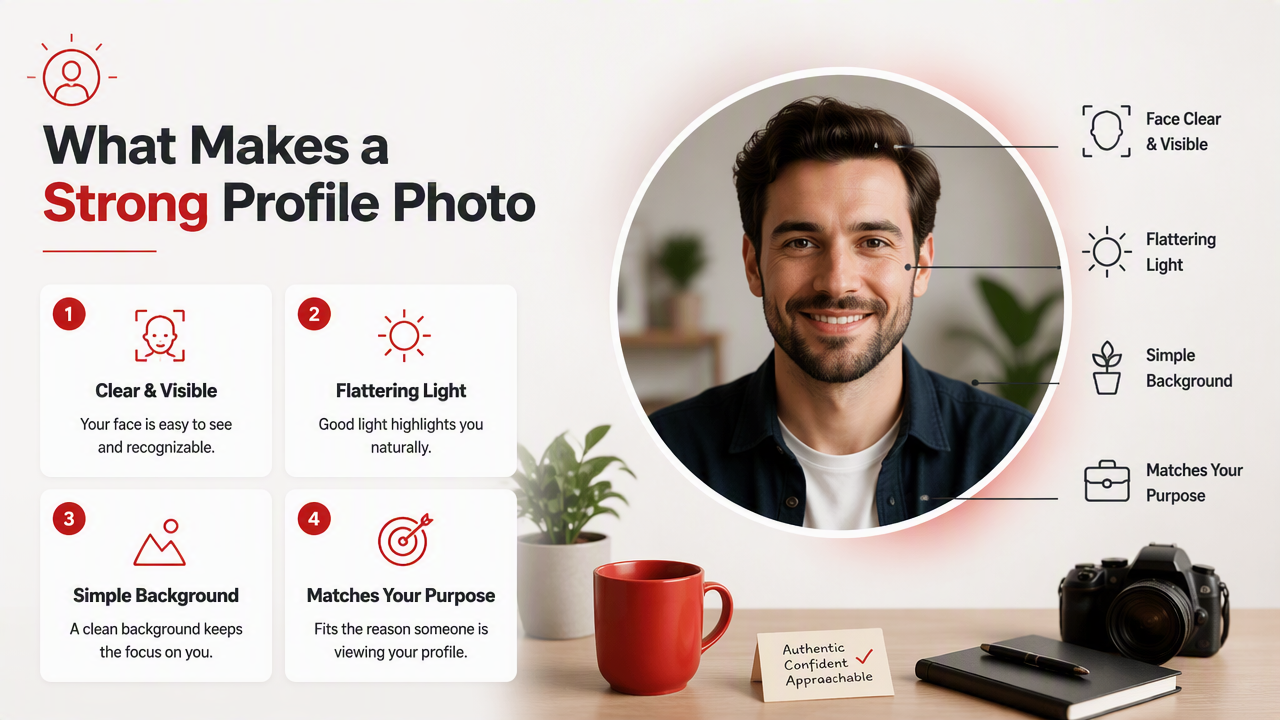
Start with visibility. If your face is tiny, shadowed, hidden behind sunglasses, or cropped at a strange angle, the viewer has to work. The internet has enough work already.
Expression comes next. A relaxed half-smile can work for professional pages. A warmer smile often performs better for dating and social use because it reads as open. Serious expressions can look stylish, but they can also read as "password reset email in human form."
Profile photo quality checklist
| Element | Best choice | Why it works |
|---|---|---|
| Face visibility | Eyes and face fully visible | Recognition happens faster |
| Lighting | Soft front or side light | Reduces harsh shadows |
| Background | Clean, relevant, not chaotic | Keeps attention on you |
| Expression | Natural and platform-appropriate | Signals mood and intent |
| Framing | Head and shoulders or upper body | Gives context without clutter |
| Authenticity | Looks like your current self | Builds trust after the click |
Use this checklist before you edit anything. If the base image fails on visibility, lighting, or expression, no filter will save it. Editing should sharpen the signal, not turn you into a wax figure with Wi-Fi.
How HotphotoAI handles styled personal portraits
The HotphotoAI platform is useful when you want more variety than your camera roll can provide. It can help generate glamour, lifestyle, model-style, fantasy, or polished profile-ready portraits while letting you experiment with outfits, backgrounds, and lighting ideas.
I'd use it for situations where the goal is style exploration, not deception. The strongest AI-assisted image still needs to look like you, fit the platform, and feel believable beside your other photos.
How should you choose a photo for each platform?
Choose your photo by matching the viewer's intent: dating apps need warmth and realism, social platforms need personality, and professional networks need clarity and competence. The same face can work everywhere, but the framing, outfit, background, and expression should change.
A dating app image should make someone comfortable starting a conversation. A creator profile should be recognizable at thumbnail size. A professional account should reduce doubt quickly, especially if clients, recruiters, or collaborators are scanning fast.
Platform fit beats universal perfection. The "best" image is the one that helps the right viewer understand you faster.
Best image style by use case
| Platform type | What to show | What to avoid |
|---|---|---|
| Dating apps | Clear face, friendly expression, recent photo | Group shots as the first image |
| Instagram or TikTok | Personality, color, style, visual consistency | Overly generic stock-photo energy |
| LinkedIn or portfolio | Clean headshot, calm background, neat clothing | Party crops or heavy filters |
| Creator pages | Distinct look, brand colors, memorable pose | Images that change style every week |
| Gaming or community forums | Avatar, character art, or stylized identity | Confusing images that hide your persona |
Dating profiles usually need more than one image, but the first one has a special job. It should show your face well enough that the second photo feels like extra context, not detective evidence.
For creators, consistency matters. If your audience sees your photo beside comments, videos, newsletters, and store pages, use a visual style that travels well at small sizes.
A simple selection process
- Pick three recent images where your face is easy to see.
- Remove any photo where the background steals attention.
- Choose the one that matches the platform's purpose.
- Crop it so your face remains readable as a small circle.
- Ask one honest friend what impression it gives.
- Replace it if their answer doesn't match your goal.
This process sounds basic because it is. Most bad account photos fail one of these steps, not because the person is unattractive, but because the image is doing unpaid sabotage.
How can AI improve personal portraits without making them fake?
AI can improve personal portraits by expanding style options, testing lighting and backgrounds, and creating polished variations while keeping your identity recognizable. The safest approach is to use AI for presentation, not reinvention.
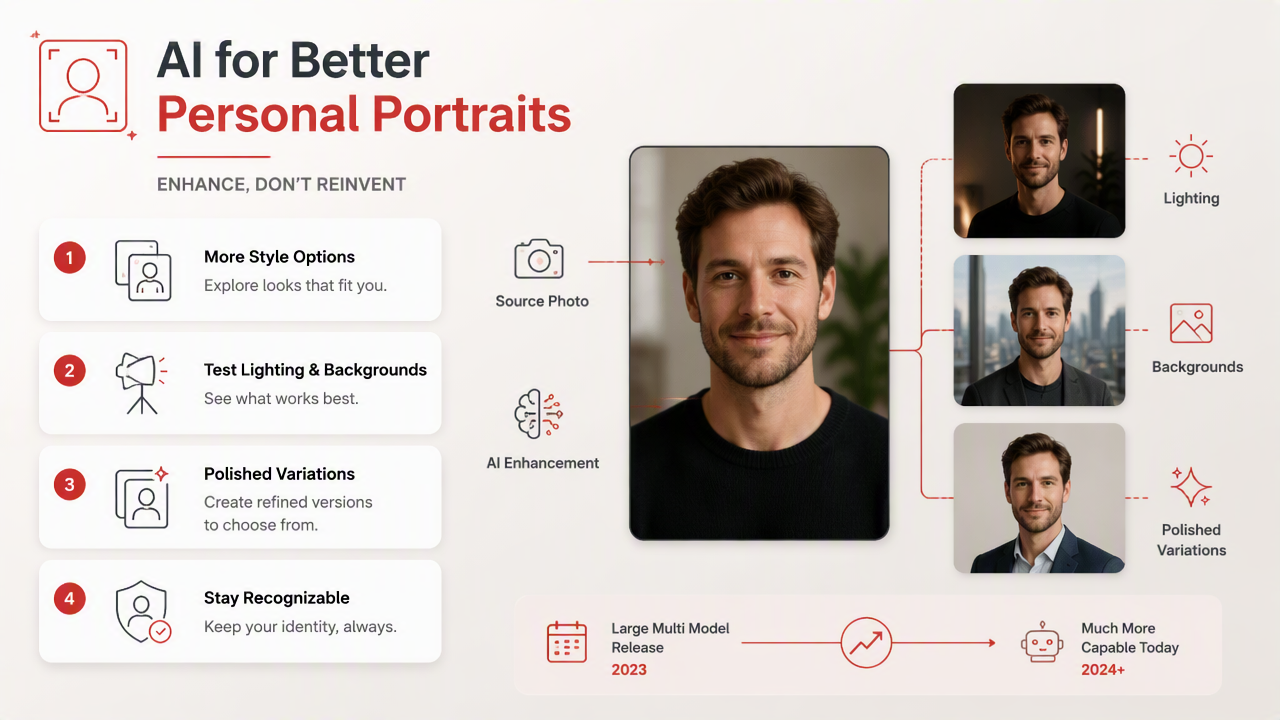
Generative systems have become much more capable since the release of large multimodal models discussed in the GPT-4 Technical Report. For personal images, that progress shows up in better styling, more realistic compositions, and faster iteration.
Still, good taste matters. If a portrait makes you look like your richer cousin from a luxury perfume ad, dial it back. The viewer should think, "great photo," not "which casting agency made this person?"
Smart ways to use AI portraits
- Test professional, casual, glamour, and lifestyle looks before committing to a shoot.
- Try backgrounds that match your goals, such as city, studio, beach, office, or editorial settings.
- Explore outfit ideas that fit your personality and platform.
- Create a consistent visual identity across dating, social, and work accounts.
- Use the final image as one part of your presence, not as a full personality transplant.
With HotphotoAI, the sweet spot is controlled experimentation. You can see how different styles change the impression you give, then choose the version that feels most useful and most like you.
Where AI-edited images need restraint
Avoid edits that change core identity markers so much that people would not recognize you. Extreme smoothing, altered facial structure, fantasy-only styling, or mismatched body proportions can create distrust when someone sees your other content or meets you offline.
The practical test is simple: would a friend recognize you in two seconds? If yes, the image is probably still grounded. If no, you have made a beautiful stranger, which is less useful unless you are writing a spy novel.
What will profile photos need in 2027?
In 2027, profile photos will need stronger authenticity signals because AI-generated portraits, avatars, and immersive identities will become more common. People will still want attractive images, but they will also look for consistency across photos, videos, and real interactions.
Expect more platforms to reward current, verifiable, and context-matched visuals. A polished AI-assisted portrait may work well as a lead image, especially when supported by casual photos, short videos, or consistent social content.
The future is not "real versus AI." It is "believable versus confusing." Users who treat their account image as part of a larger identity system will look more trustworthy than users who change styles randomly every few weeks.
2027-ready photo principles
- Keep one recognizable visual thread across platforms.
- Update your main image when your look changes meaningfully.
- Pair polished portraits with candid context when trust matters.
- Use avatars where they fit the community, not where a face is expected.
- Choose style upgrades that support your goals instead of chasing every trend.
If you want to test upgraded looks now, visit hotphotoai.com and compare several styles before choosing the one that best fits your dating, social, or professional goal.
FAQ: common questions about profile images
How often should I update my main photo?
Update it when your appearance, role, or goal changes. For dating, a recent image is especially important because trust starts before the first message. For professional profiles, update after a major hairstyle change, rebrand, job shift, or anytime the current photo no longer matches how you show up in meetings.
Should I smile in my profile photo?
A smile usually helps when warmth and approachability matter, especially on dating apps and social platforms. Professional photos can use a relaxed smile or calm neutral expression. The right choice depends on the signal you want to send, but forced expressions almost always look worse than natural ones.
Are AI-generated portraits acceptable for online profiles?
AI-generated portraits are acceptable when they represent you honestly and fit the platform. They work best for style, lighting, wardrobe, and background variation. They become risky when they change your face, age, body, or overall identity so much that viewers would feel misled.
What is the biggest mistake people make with account photos?
The biggest mistake is choosing a photo they personally like but strangers cannot read quickly. Tiny faces, dark lighting, busy backgrounds, old images, and heavy filters all reduce trust. A strong image should make recognition easy before it tries to be artistic.
Conclusion
The best profile pictures make you easy to recognize, easy to trust, and easy to place in the right context. Start with a clear face, flattering light, clean framing, and a real expression. Then choose the version that fits the platform instead of forcing one image to do every job.
If your camera roll is all car selfies, wedding crops, and one mysterious vacation photo from 2019, create better options. Try a few looks with HotphotoAI, compare them against the checklist above, and pick the image that feels polished, current, and unmistakably you.