Tinder Smart Photos: How It Works and How to Beat the Algorithm Politely
TL;DR
Tinder Smart Photos can help reorder your profile photos based on early engagement, but it cannot rescue unclear, awkward, or mismatched images. Start with a strong first-photo candidate, test a balanced photo set, and use the feature as a feedback tool, not a magic wand.
Your first Tinder photo does more than introduce your face; it asks a stranger to make a tiny yes-or-no decision while holding a latte, riding an elevator, or pretending not to be bored. Tinder Smart Photos: a Tinder setting that tests profile photo order and prioritizes the image that appears to get stronger swipe interest. For users who want polished, realistic personal images before testing them in-app, HotphotoAI can help create varied dating-profile-style shots with different outfits, lighting, and backgrounds.
Table of Contents
What is Tinder Smart Photos?
Tinder Smart Photos is a profile setting that automatically rotates your photos and learns which one should appear first based on user engagement. In plain English: it tries to stop your fifth-best photo from sitting in the most valuable spot while your strongest image hides like it owes someone money.
Tinder is part of Match Group, the Dallas-based internet and technology company that owns a large portfolio of dating services, including Tinder. The feature fits a broader app trend: platforms use behavioral signals to decide what users see first, then adjust based on responses.
Key insight: Smart ordering can improve photo placement, but it does not decide whether your photo set is attractive, trustworthy, or date-worthy in the first place.
Quick terminology for dating-photo testing
- Lead photo: the first image someone sees before opening the rest of your profile.
- Photo set: the full group of images on your dating profile.
- Engagement signal: an app-observed action, such as how users respond after seeing a photo.
- Optimization: the process of improving photo order or content based on performance.
Research on human-AI interaction, such as Kang and Lou's 2022 study on agency and engagement in TikTok, shows why this matters: users often interact with algorithmic systems while still trying to preserve human choice and control (Journal of Computer-Mediated Communication). Dating apps are no different. Let the machine sort, but don't let it pick your personality.
How does the feature actually work?
Smart photo ordering works by showing different photos first to different viewers, then favoring the image that appears to perform best. You still choose the photos, but Tinder decides which one leads more often once the setting has enough behavior to compare.
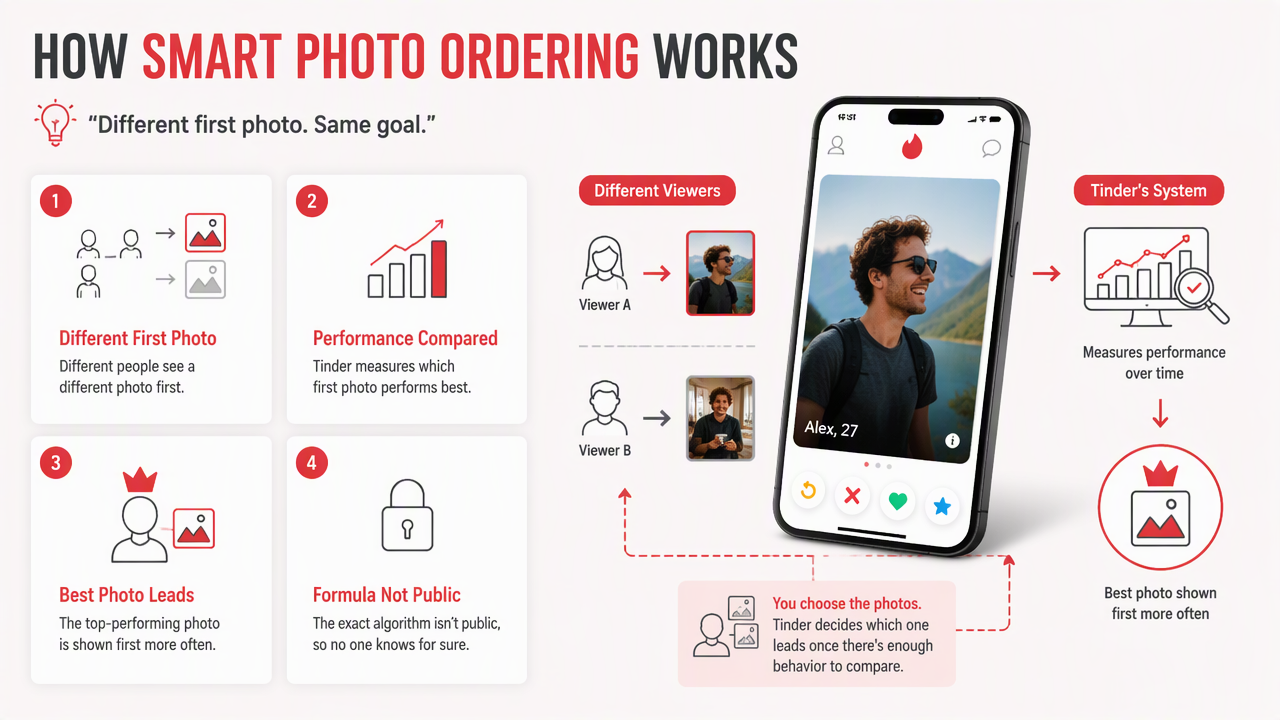
The exact formula is not public, so anyone claiming to know the secret sauce is probably also selling a course filmed in a rented Lamborghini. Treat it as a practical A/B test, not a transparent scientific audit.
Smart Photos vs. manual photo order
| Factor | Smart ordering | Manual ordering | Best use |
|---|---|---|---|
| First-photo choice | App rotates and prioritizes | You choose the lead image | Use both, but start manually |
| Control | Lower | Higher | Manual helps with strategy |
| Feedback | Behavioral, indirect | Based on your judgment | Smart ordering helps validate |
| Weak photo detection | Limited | Depends on honest review | Remove obvious weak links first |
| Best for | Testing close contenders | Building a deliberate story | Combine for stronger results |
I prefer starting with a manual order for at least one simple reason: you understand your own goal better than the app does. If you want serious dates, your first photo should signal warmth and clarity. If you want nightlife energy, it may signal style and confidence. The app can compare reactions, but it cannot read your dating intent.
What signals should you assume it values?
The safest assumption is that the feature values comparative response patterns, not artistic merit. A photo with bright lighting, a clear face, and friendly expression will usually give the system cleaner data than a moody silhouette where you look like the final boss of brunch.
Use a test set with real contrast between images:
- One clear head-and-shoulders photo.
- One full-body or outfit photo.
- One social or activity photo.
- One travel, hobby, or lifestyle image.
- One polished image with strong lighting and background contrast.
Privacy also matters when apps process personal images and social signals. Jain, Sahoo, and Kaubiyal's 2021 review covers security and privacy risks across online social networks, which is a useful reminder to avoid exposing addresses, workplace badges, license plates, or private routines in profile photos (Complex & Intelligent Systems).
What can it optimize, and what can't it fix?
Smart ordering can optimize which existing photo appears first, but it cannot fix poor photo quality, confusing identity cues, weak expressions, or a profile that sends mixed signals. It ranks the ingredients you give it; it does not turn stale bread into tiramisu.
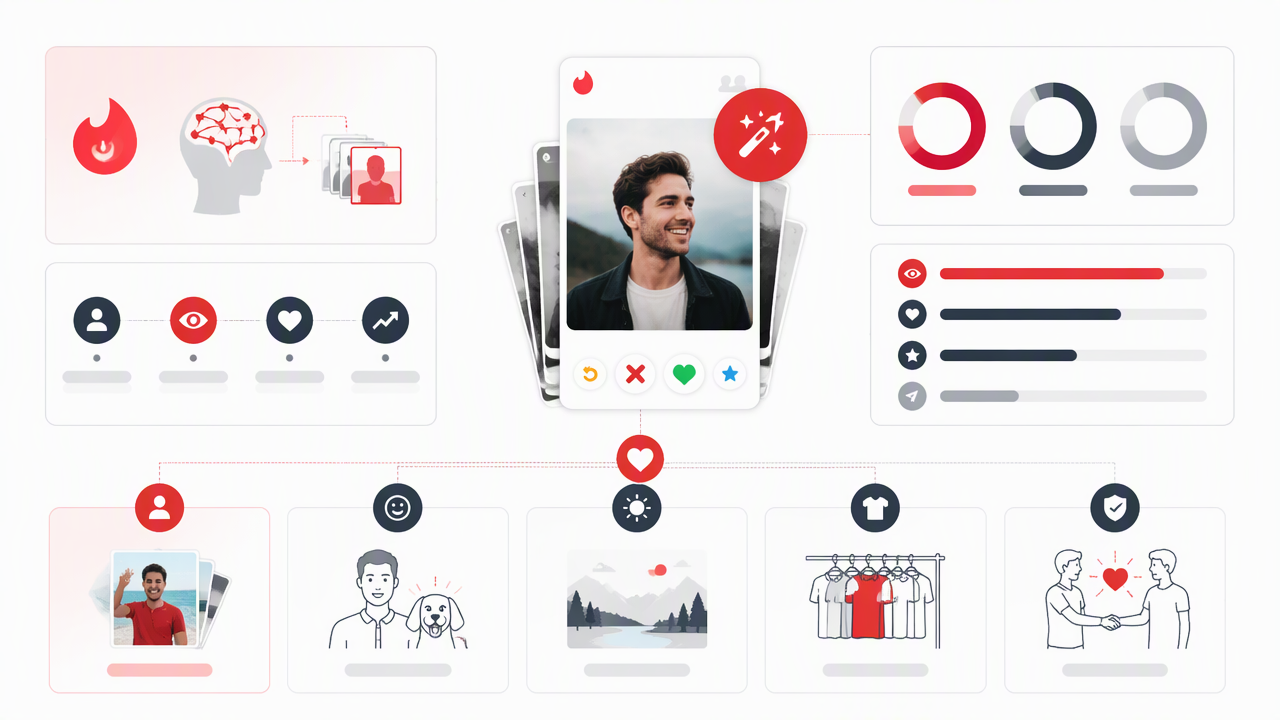
A useful rule: if a friend cannot identify you in two seconds, the photo should not be in your test set. Group shots, sunglasses, heavy filters, and dim lighting all make the system's job harder because people are reacting to uncertainty, not attraction.
What the setting can realistically improve
- Lead-photo selection: it may discover that your second or third image gets better responses.
- Order confidence: it can reduce guesswork when several photos seem equally strong.
- Early impression testing: it helps identify which visual version of you creates the best first reaction.
- Photo-set learning: it can reveal that a casual shot beats a stiff, overedited one.
What the setting cannot rescue
Avoid loading the feature with photos that fail basic dating-profile fundamentals:
- Blurry face, low light, or harsh bathroom mirror glare.
- Cropped exes, mystery hands, or suspicious shoulders.
- Five photos from the same angle, outfit, and room.
- Overfiltered skin that looks less human than a wax museum intern.
- Images that imply a lifestyle you do not actually live.
Paasonen's 2021 book Dependent, Distracted, Bored examines digital attention and affect, which fits dating apps well: people make quick, distracted judgments in emotionally loaded spaces (MIT Press). Your photo has to communicate fast, cleanly, and honestly.
How should you choose a first photo before turning it on?
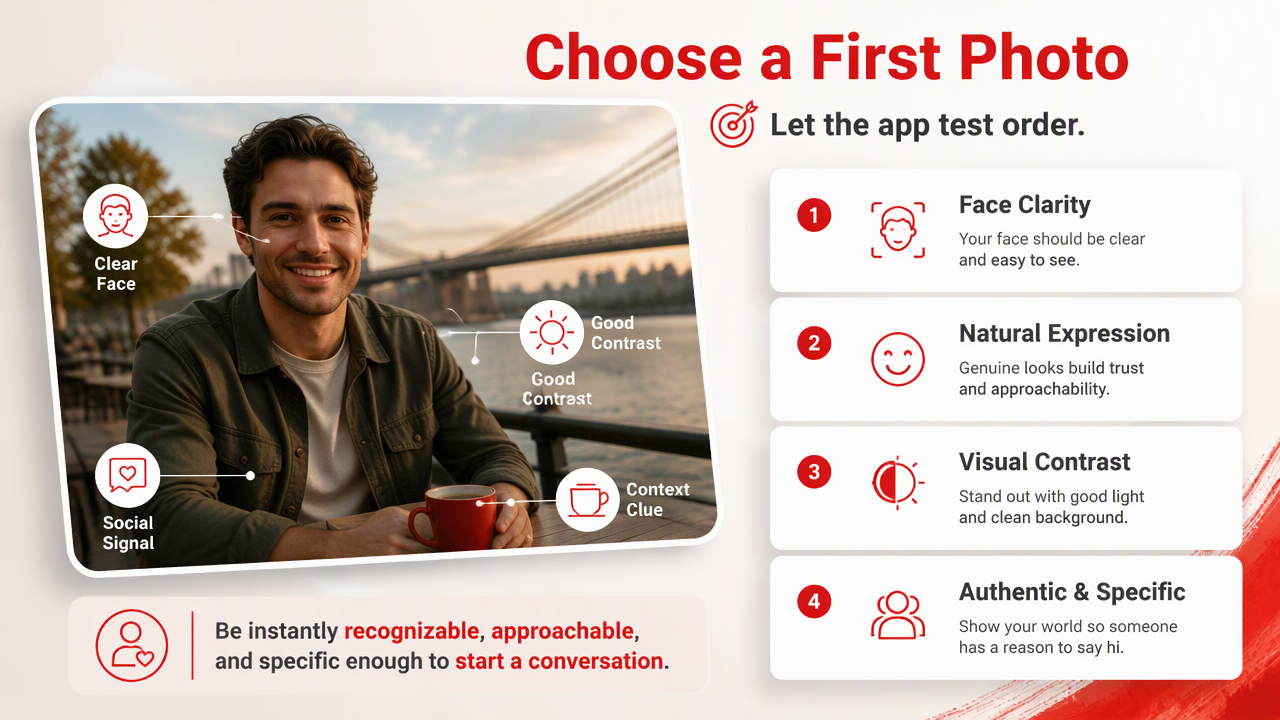
Choose a first photo by prioritizing face clarity, natural expression, visual contrast, authenticity, and a clear social signal before letting the app test order. The best lead image should make you instantly recognizable, approachable, and specific enough that someone can imagine starting a conversation.
Do not outsource the first draft to automation. Give the system a strong shortlist, then let it compare. That small bit of human taste keeps your profile from becoming a committee decision made by strangers with thumbs.
A simple first-photo checklist
Use this checklist before enabling the setting:
- Face clarity: your eyes and face are visible without zooming.
- Expression: you look relaxed, not trapped in a corporate hostage video.
- Lighting: your face is brighter than the background.
- Contrast: your outfit, background, and skin tone do not visually blend together.
- Authenticity: the photo looks like someone could meet this version of you next week.
- Context: the image hints at lifestyle without becoming a travel brochure.
If you need more controlled variety, the HotphotoAI platform can be useful for testing polished concepts: outdoor lifestyle, studio portrait, smart-casual, formal, or creative looks. Keep the final set believable, because a great match still has to meet the real you.
A better photo sequence for real dates
A strong Tinder photo sequence should move from trust to interest to conversation. I'd structure it like this:
- Photo 1: clear face, warm expression, strong lighting.
- Photo 2: full-body or outfit shot with natural posture.
- Photo 3: lifestyle image that shows a hobby, city, pet, sport, or creative interest.
- Photo 4: social proof, but only if you are easy to identify.
- Photo 5: a polished wildcard, such as a stylish portrait or travel scene.
Key insight: The first photo earns the pause; the rest of the set earns the belief that you are worth messaging.
Frequently asked questions
Smart photo ordering is most useful when your photo set is already strong, varied, and honest. These quick answers cover the questions people usually ask before flipping the switch and hoping romance becomes a software update.
Should I turn Smart Photos on or off?
Turn it on after you remove weak photos and choose a strong manual order first. If your images are clear, varied, and recent, the setting can help test which photo performs best. If your set has blurry shots, confusing group photos, or heavy filters, fix those before trusting automation.
Does it guarantee more matches?
No. It may improve which photo appears first, but matches also depend on location, age range, preferences, bio, activity level, timing, and the quality of your whole profile. Think of it as a photo-order assistant, not a match machine with a tiny bow tie.
How many photos should I test?
Use enough photos to show range, but not so many that your profile feels repetitive. A practical set includes a clear lead portrait, one full-body image, one lifestyle or hobby photo, one social-context image, and one polished portrait. Quality beats filling every slot just because the app allows it.
Can AI-generated photos work on Tinder?
AI-assisted photos can work when they stay realistic, current, and aligned with how you actually look. They should improve lighting, setting, styling, and variety, not create a fictional person. If you use HotphotoAI, choose images that still feel meetable, then visit hotphotoai.com when you want more style options.
Conclusion
Tinder Smart Photos is worth using, but only after you build a photo set that deserves to be tested. Start with a clear, friendly lead image, add variety that shows real lifestyle context, remove anything confusing, then let the feature compare your strongest contenders.
For your next profile refresh, pick five photos, score each one on clarity, expression, authenticity, contrast, and conversation value, then turn the setting on for a clean test. If you want polished new options before that test, try HotphotoAI or head to hotphotoai.com and create a few realistic looks you'd actually show up as on a date.