Train AI on Your Face: What It Means, How It Works, and What You Can Create
TL;DR
Training a personal AI face model works best when you upload varied, clear photos with different angles, expressions, and lighting. Use it when you want consistent dating, glamour, lifestyle, or professional portraits without booking a shoot, but check privacy, consent, and deletion options before you start.
Your camera roll can now become the raw material for a private portrait studio, minus the awkward "what do I do with my hands?" moment. To train AI on your face, you upload multiple photos so a model can learn your facial identity, then generate new images of you in different outfits, poses, scenes, and styles. Face-trained AI model: a personalized image model adapted from a larger generative AI system so it can create new portraits that resemble a specific person. For people who want dating photos, social content, glamour portraits, or polished profile images, HotphotoAI turns that idea into a guided workflow instead of a weekend coding project.
Table of Contents
What does it mean to train AI on your face?
To train AI on your face means giving an image model enough examples of you that it can recognize and recreate your facial identity in new generated portraits. The model does not simply paste one selfie onto another body; it learns visual patterns such as face shape, hairline, expression range, and common lighting.
In machine learning terms, the system improves its output by learning from examples. Iqbal H. Sarker's 2021 overview of machine learning algorithms and applications describes machine learning as systems that learn patterns from data to make predictions or decisions, which is the broad idea behind personal AI image training.
For face portraits, the "data" is your photo set. The "prediction" is what you would look like in a new scene, such as a rooftop date-night shot, a studio headshot, or a fantasy editorial image.
Key takeaway: a personal face model is not magic, but it is very good pattern matching wearing a tiny velvet blazer.
Face training terms in plain English
- Base model: the large image generator that already understands people, lighting, clothing, poses, and backgrounds.
- Personal training set: the photos you upload so the system can learn your appearance.
- Fine-tuning: the process of adapting the base model toward your face.
- Prompt: the text instruction that describes the new image you want.
- Output: the generated portrait, which should look like you in a new context.
How should you prepare photos for a personal AI model?
The best training photos show the same person clearly across different angles, expressions, backgrounds, and lighting conditions. A model needs variety because one perfect selfie teaches it less than a mixed set of everyday images, polished shots, side angles, and natural expressions.
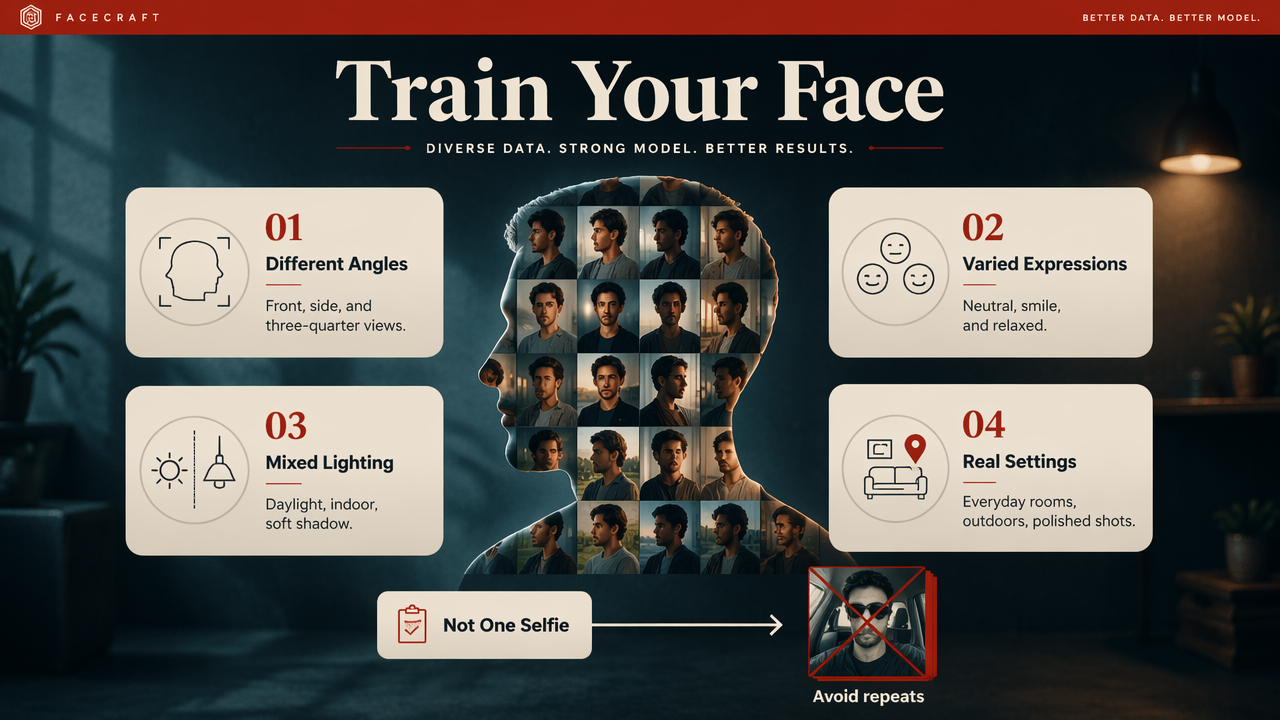
Think of your uploads as a casting call for your face. If every image has sunglasses, harsh bathroom lighting, or the same three-quarter smirk, the model may treat those details as permanent features. That's how people accidentally train a digital twin who looks trapped in one vacation album.
Training photo checklist
- Use only one person. Crop out friends, exes, photobombers, and suspiciously judgmental pets.
- Mix angles. Include front-facing, slight side, and natural candid angles.
- Vary expressions. Add smiling, neutral, relaxed, and confident looks.
- Change lighting. Use daylight, indoor light, and softer evening light when possible.
- Avoid heavy filters. Beauty filters can teach the model fake skin texture or altered features.
- Keep your face visible. Skip hats, masks, sunglasses, and extreme shadows in most uploads.
- Include recent photos. A model trained on 2018 you will not always understand 2026 you.
A good rule: upload photos that look like you on your best ordinary day, not photos that look like your phone was possessed by a nightclub strobe.
Personalized model vs generic prompt
| Approach | What it uses | Best for | Main limitation |
|---|---|---|---|
| Generic AI prompt | Text only, such as "attractive person in a suit" | Moodboards, fantasy characters, anonymous images | It won't know your actual face |
| Face-trained model | Your uploaded photo set plus prompts | Dating photos, profile images, glamour portraits | Quality depends on training photos |
| Traditional photoshoot | Camera, photographer, location, styling | Maximum realism and human direction | Higher cost, scheduling, fewer style variations |
Personalized generation sits between a prompt toy and a professional shoot. It gives you more identity consistency than generic image generation, while still letting you test styles that would be expensive or impractical in real life.
What can you create after the model is trained?
A trained personal portrait model can create consistent images of you across dating, glamour, lifestyle, fantasy, and professional styles. The point is not to replace every real photo; it is to fill gaps your camera roll does not cover, such as better lighting, sharper styling, or a more intentional setting.
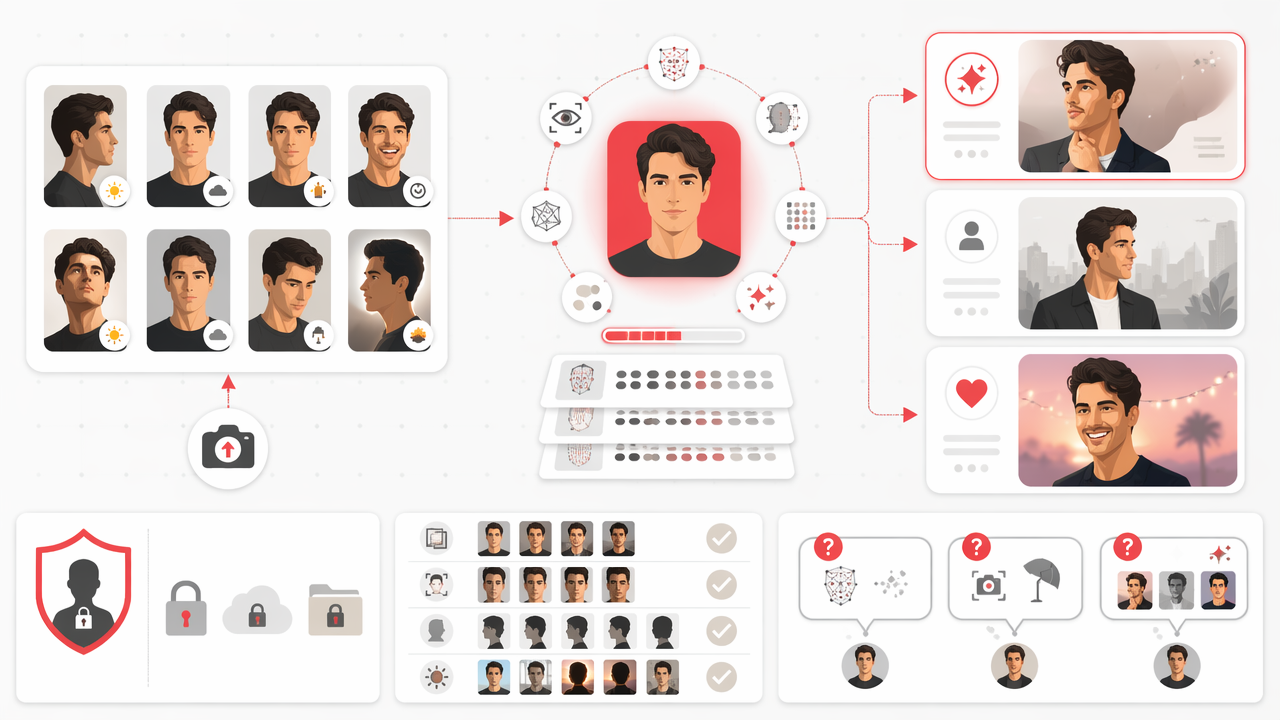
The most useful outputs usually fall into practical categories:
- Dating profile photos: warm smiles, confident solo shots, travel-style images, and clean lifestyle portraits.
- Professional images: LinkedIn-style headshots, founder photos, speaker bios, and polished website portraits.
- Social media content: editorial looks, seasonal posts, creator thumbnails, and stylized personal branding.
- Glamour and model-style portraits: studio lighting, dramatic outfits, fashion poses, and magazine-inspired images.
- Fantasy or themed images: cinematic, retro, luxury, cosplay-adjacent, or dream-location portraits.
With HotphotoAI, the practical benefit is speed: you can move from "my profile needs help" to a set of styled options without booking a photographer, buying outfits, or pretending a parking garage is an urban editorial set.
Where personalized portraits work best
Personal AI portraits work best when the final image needs to look attractive, recognizable, and contextually believable. Dating apps are a strong use case because users need variety: one face-forward image, one full-body lifestyle shot, one social-looking photo, and one polished "yes, I own a calendar" image.
For professional use, restraint matters. A clean headshot with realistic lighting will often outperform an image where you look like the youngest board member of a moon colony.
Best use case: generate options, then choose the images that still feel like you would actually show up to coffee looking that way.
What to expect in 2027
By 2027, personal AI portrait tools will likely become more style-aware, consent-aware, and editing-friendly. Research discussions around generative AI, including the 2023 multidisciplinary paper by Yogesh K. Dwivedi and coauthors on opportunities and implications of generative conversational AI, show how quickly AI systems are moving from novelty to everyday workflow.
For users, the next step is likely more control: stronger face consistency, easier outfit changes, better background realism, and clearer safety settings. The winning tools will make great images while keeping the user in charge.
What privacy expectations should you have before uploading face photos?
You should expect clear answers about photo storage, model training, deletion, consent, and whether your images are used beyond your personal outputs. Face data is sensitive because it identifies you, so a portrait tool should explain what happens after upload in plain language, not legal fog with a bow tie.
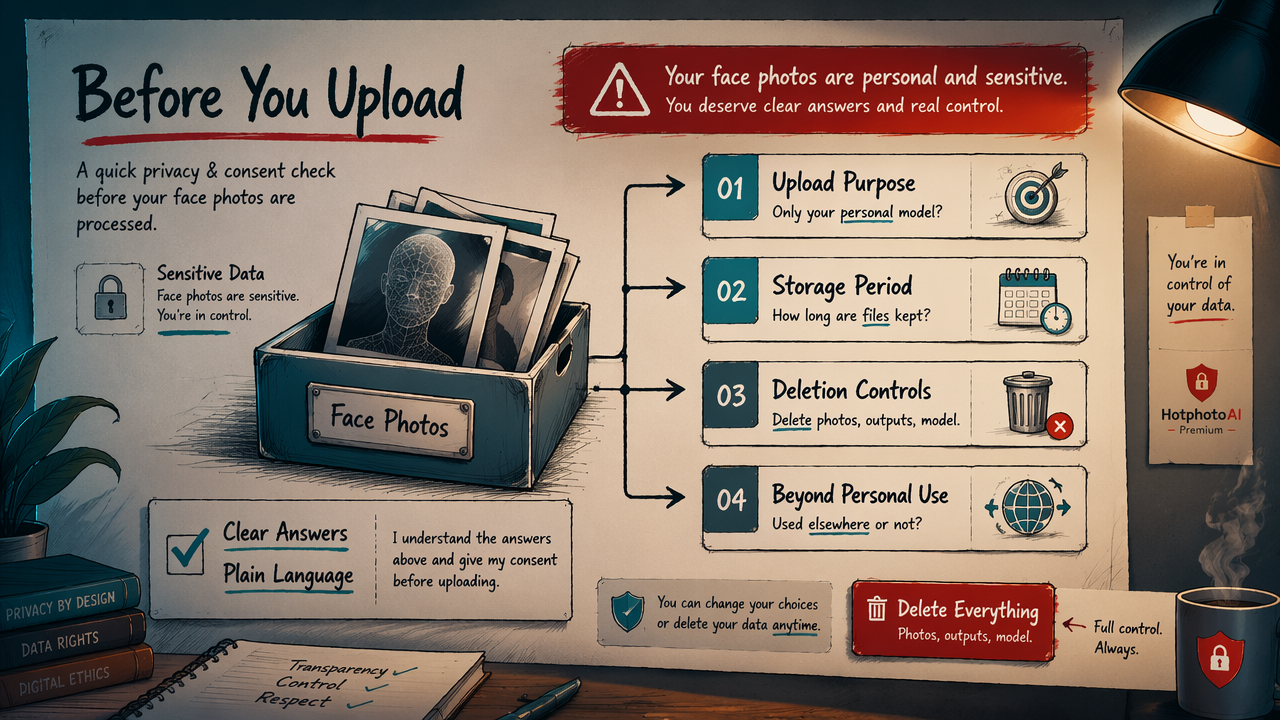
Before using any personal AI image service, check the basics:
- Upload purpose: Are your photos used only to create your personal model?
- Storage period: How long are uploads and generated images kept?
- Deletion controls: Can you delete images, outputs, or the trained model?
- Commercial use: Are your images used to improve shared systems or marketing datasets?
- Consent: Do you have the right to upload every person visible in the photo?
Privacy is not just a checkbox. If another person appears in your training set, remove that photo unless you have permission. The model is supposed to learn your face, not accidentally enroll your roommate.
For a safer workflow, keep your uploads simple: solo photos, recent images, no IDs, no private documents in the background, and no children's images. Save the spy-thriller paperwork for the movies.
How HotphotoAI handles the user workflow
The HotphotoAI platform is built around a guided personal-photo flow: upload face examples, choose the portrait direction you want, and generate polished images for profiles, dating, glamour, or lifestyle use. That structure matters because most users do not want to install Stable Diffusion, choose a fine-tuning method, or learn LoRA vocabulary before getting a decent photo.
If you're comparing options, I'd pick a tool based on three things: how easy the upload process is, how useful the final styles are, and how clearly the service explains user controls. For a focused personal portrait workflow, head to hotphotoai.com and start with a small, high-quality photo set.
FAQ about training AI on your face
A face-trained AI model is useful when you want more flattering, varied, and styled images than your current camera roll provides. The details below answer the questions people usually ask before uploading their first photo set.
How many photos do I need?
Most personal image tools ask for multiple photos because variety helps the model learn your face more accurately. Prioritize quality over quantity: clear solo images, different angles, natural expressions, and mixed lighting. A dozen useful photos beats a folder of blurry duplicates from the same night out.
Will the AI photo look exactly like me?
A good result should be recognizable as you, but it may not be pixel-perfect. Image models estimate identity from patterns, so outputs can shift small details like teeth, hands, skin texture, or hair. Treat the first batch as options to review, not as automatic profile-photo truth.
Can I use AI portraits on dating apps?
You can use AI portraits on dating apps if they honestly represent your appearance and do not mislead people about your body, lifestyle, or age. I'd mix polished AI images with real photos so your profile feels attractive but grounded. Nobody wants to date a cinematic hallucination.
Is training a model better than using a generic AI prompt?
Yes, if the goal is to create images that look like you. A generic prompt can produce attractive people, but it has no reliable knowledge of your face. A personal model uses your photos as identity references, which makes it better for dating, social, and professional profile images.
Conclusion
Training a personal AI model is best understood as teaching an image system your visual identity, then asking it to create new portraits in styles your camera roll does not already contain. Start with clear, varied, recent solo photos; avoid filters and clutter; then choose outputs that still feel believable. If you want to train AI on your face for dating, glamour, lifestyle, or professional images without building the technical stack yourself, visit hotphotoai.com and prepare a small set of strong photos before you generate your first batch.